Set up SPF, DKIM, DMARC for Google Workspace mailboxes and a Namecheap domain
Last updated: May 17, 2025
SPF, DKIM and DMARC are email security protocols, that once set up, prove your emails are legitimate, thus preventing them from being marked as Spam.
SPF
Step 1: Find your Domain DNS management page
If you don't have access to the login credentials, share this guide with someone in your organization who does, usually the IT team, or the person that bought the domain.
You'll need access to the domain management page to set up SPF, DKIM and DMARC.
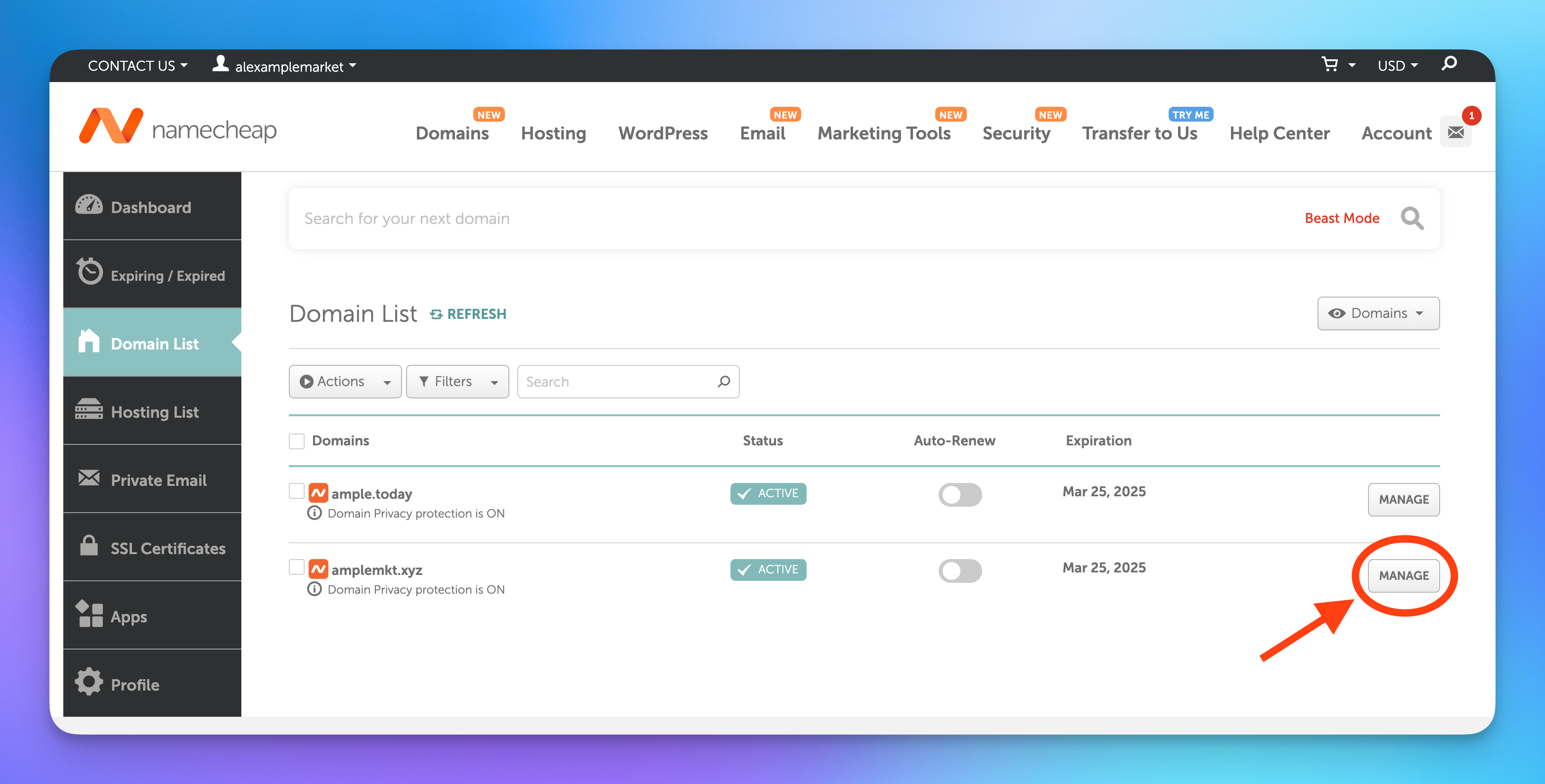
- Go to https://ap.www.namecheap.com/domains/list/, find your domain and press Manage
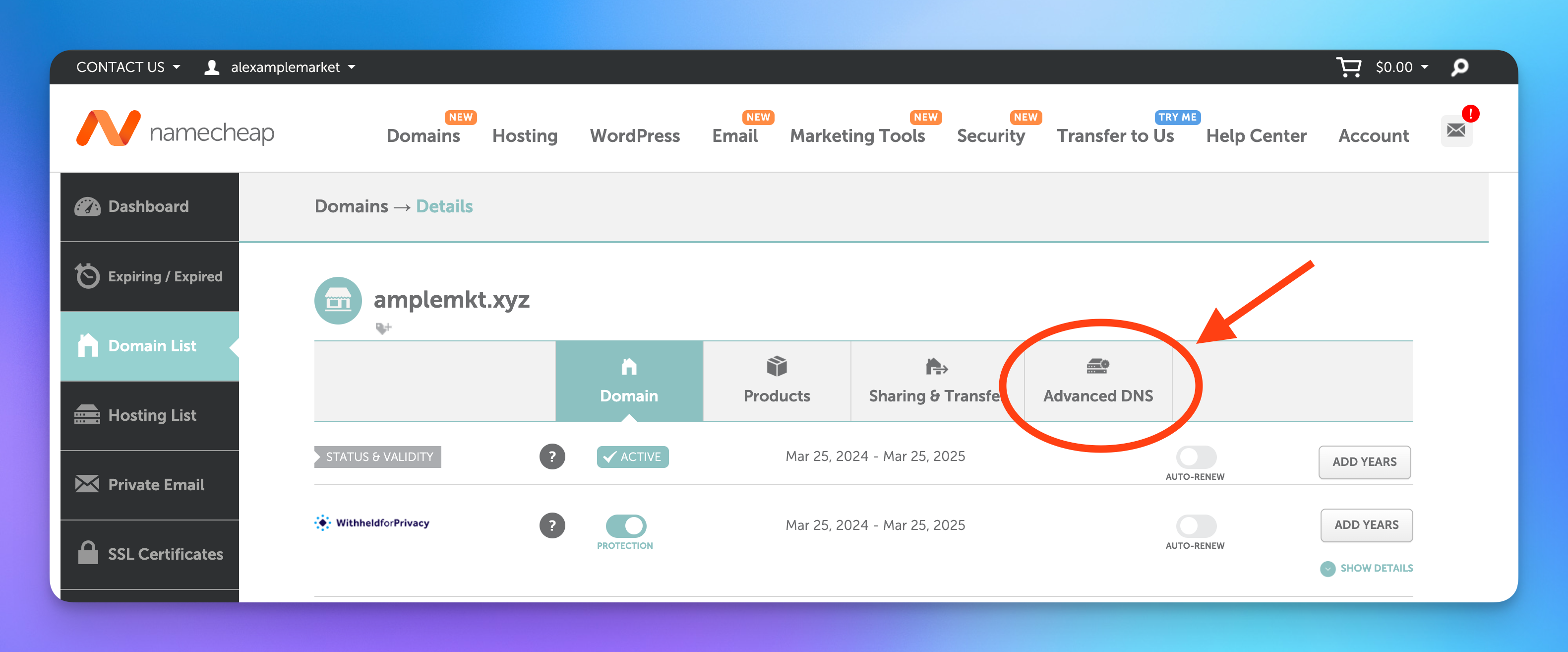
- Click on the Advanced DNS tab
Step 2: Update or create an SPF record
Search for a TXT record starting with v=spf1:
- If you find one: jump to the Update an SPF record section.
- If you do not find any SPF record, go to section below.
Create an SPF record
- Press the "ADD NEW RECORD" button
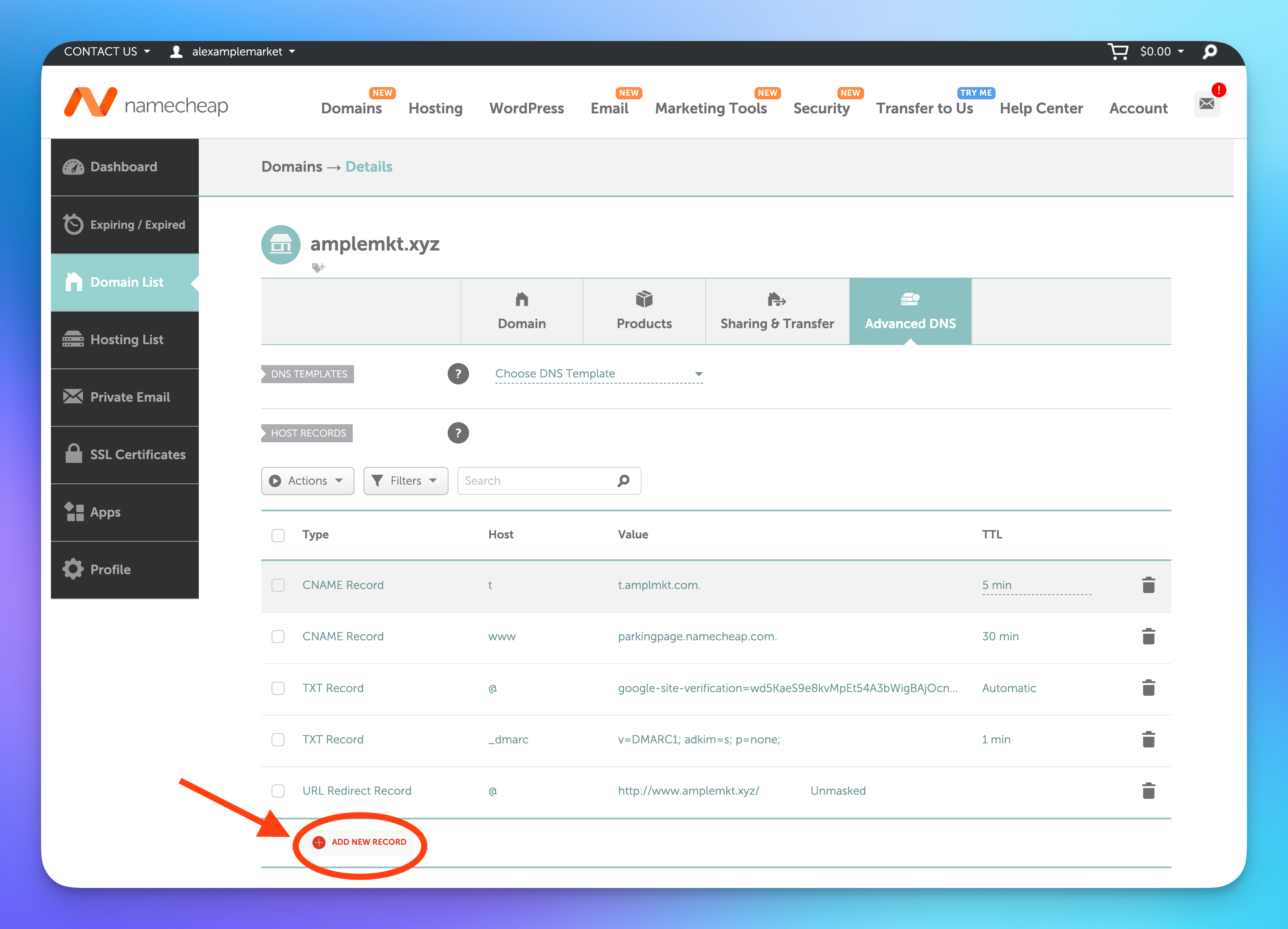
- Add the new SPF record and save changes
Type Host Value TTL TXT Record
@
v=spf1 include:_spf.google.com ~all
5 min

- Make sure you Save Changes.
- Your record is now created, move to Step 3: Validate your SPF setup.
Update an SPF record
To update the existing SPF record, you will need to add include:_spf.google.com to the record's Value field.
For example, your current record value may look like this:
v=spf1 ip4:1.2.3.4 include:thirdparty.com ~all
After the update, it should be this:
v=spf1 ip4:1.2.3.4 include:thirdparty.com include:_spf.google.com ~all
Step 3: Validate your SPF setup
If the validation fails, it may be because DNS changes can take a while to propagate. Try again in a couple of minutes.
Within Amplemarket
- Go to the Domain Health Center
- Find a mailbox for the domain you just configured, and press the Authentication cell
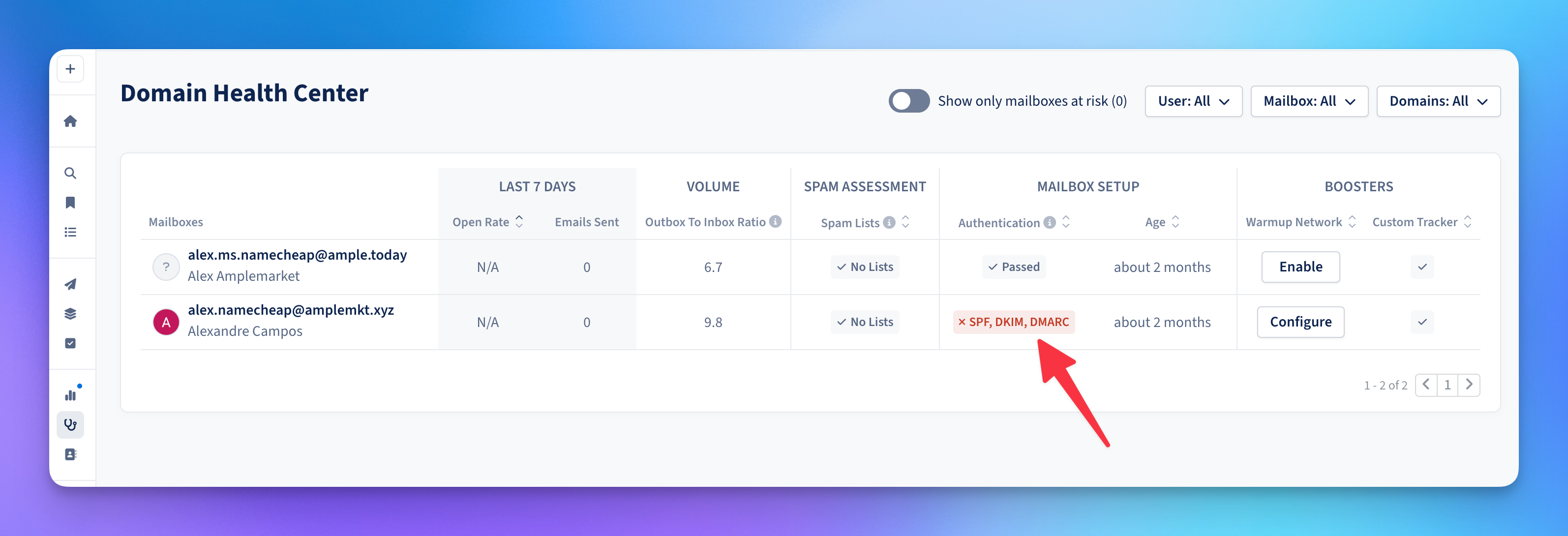
- Press Run tests to run an Authentication check
- Once completed, the SPF should now show as pass
Outside Amplemarket
If you don't have access to Amplemarket you can verify if your SPF is correctly setup on a free tool like: https://mxtoolbox.com/spf.aspx
Common SPF Error Cases
Multiple SPF Records
You can not have multiple spf records for the same Host.
If you do, you will need to merge them into one.
For example, if you have 3 SPF records:
| Type | Host | Value | TTL |
|---|---|---|---|
TXT Record |
@ |
v=spf1 include:_spf.google.com ~all |
5 min |
TXT Record |
@ |
v=spf1 ip4:1.2.3.4 ~all |
5 min |
TXT Record |
@ |
v=spf1 include:thirdparty.com ~all |
5 min |
You will need to transform them into just one, be editing one of them and deleting the others, the final result should be only record with the v=spf1 for the @ Host.
| Type | Host | Value | TTL |
|---|---|---|---|
TXT Record |
@ |
v=spf1 ip4:1.2.3.4 include:thirdparty.com include:_spf.google.com ~all |
5 min |
Malformed SPF Record
This could be a typo or a misplaced element.
Copy and paste the record you have to this SPF syntax checker to help you find the issue: https://vamsoft.com/support/tools/spf-syntax-validator
DKIM
Step 1: Find your Domain DNS management page
If you don't have access to the login credentials, share this guide with someone in your organization who does, usually the IT team, or the person that bought the domain.
You'll need access to the domain management page to set up SPF, DKIM and DMARC.
- Go to https://ap.www.namecheap.com/domains/list/, find your domain and press Manage
- Click on the Advanced DNS tab
- Keep this tab open as you'll need it later in the guide.
Step 2: Generate DKIM keys for Google Workspace
- Go to your Google Workspace Admin Panel - DKIM Authentication page
- Select your domain
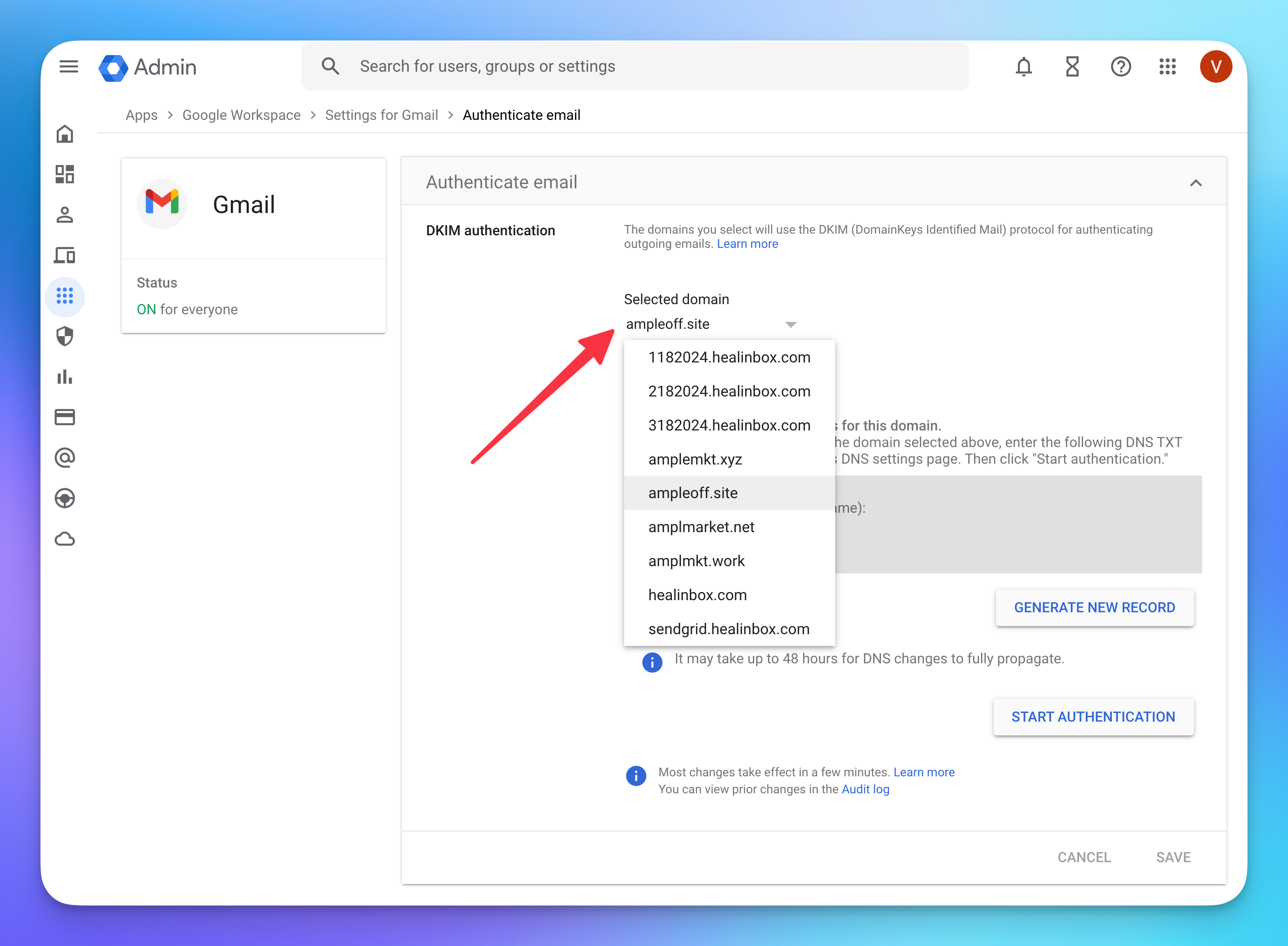
- Press the GENERATE NEW RECORD button
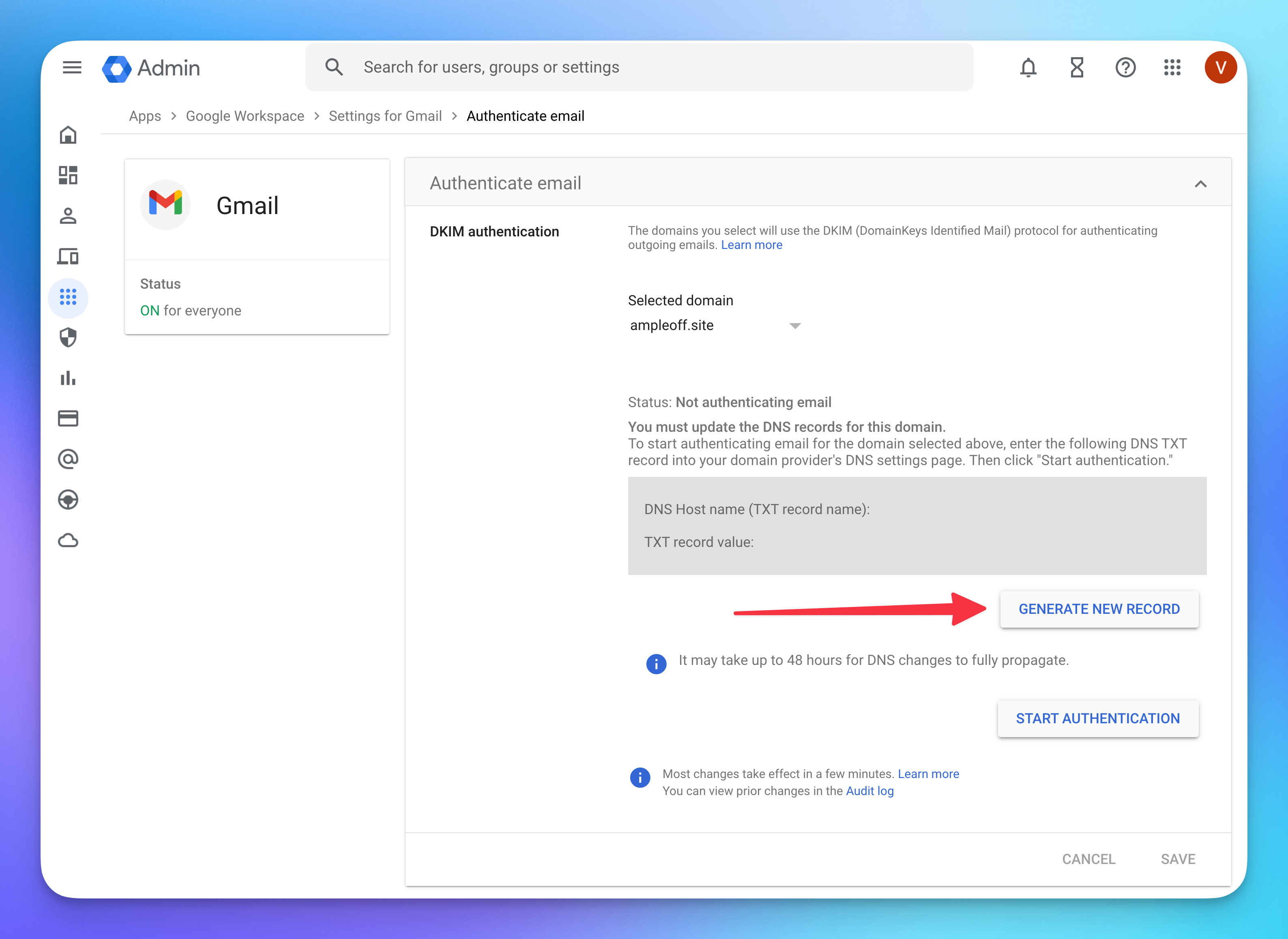
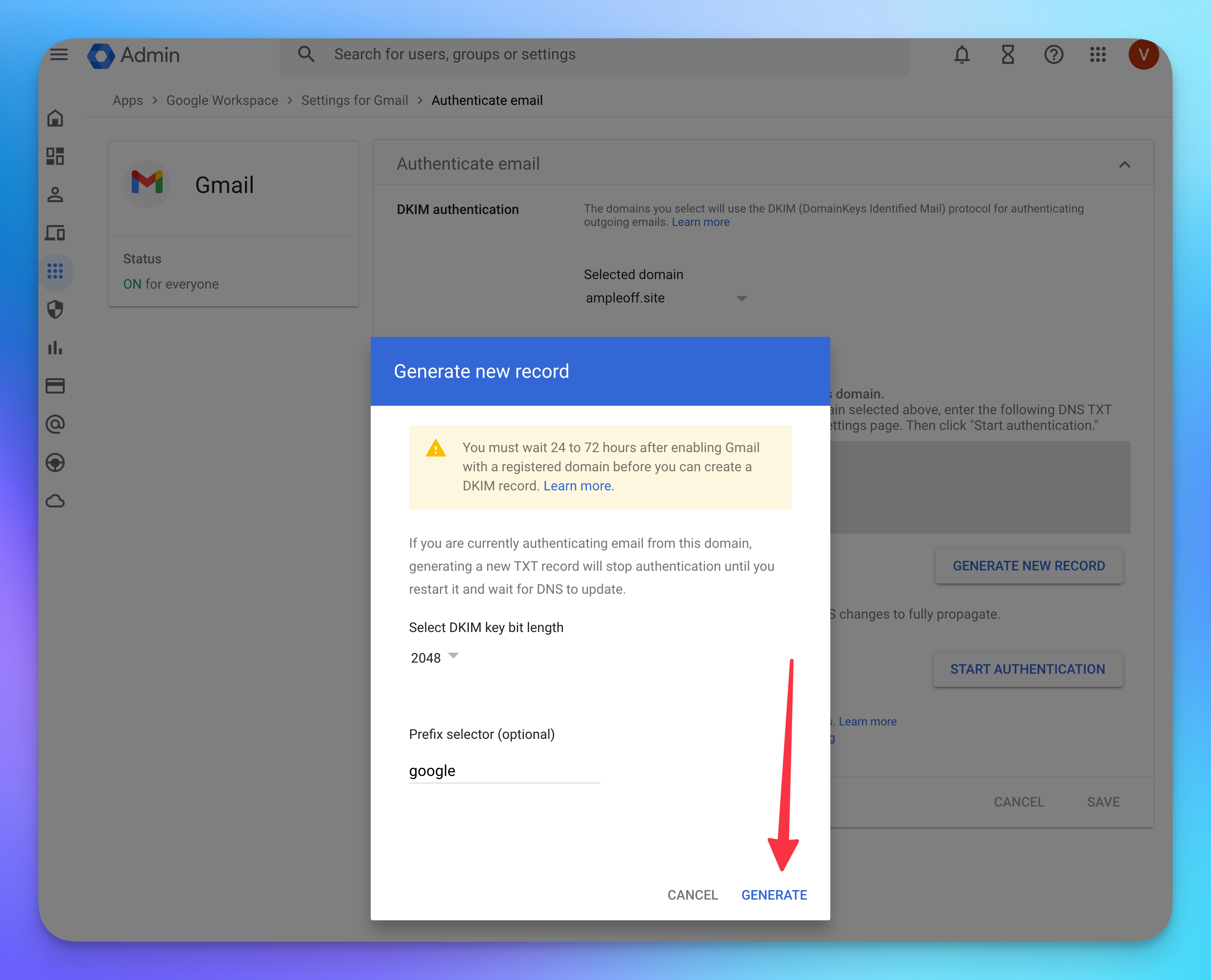
- Keep this page opened as you'll need it later
Step 3: Create the DKIM Record on Namecheap
Now that you've generated the DKIM records on Google Workspace, you'll need to copy them over into Namecheap to create a DNS record.
- Copy record from Google Workspace to Namecheap's DNS settings page
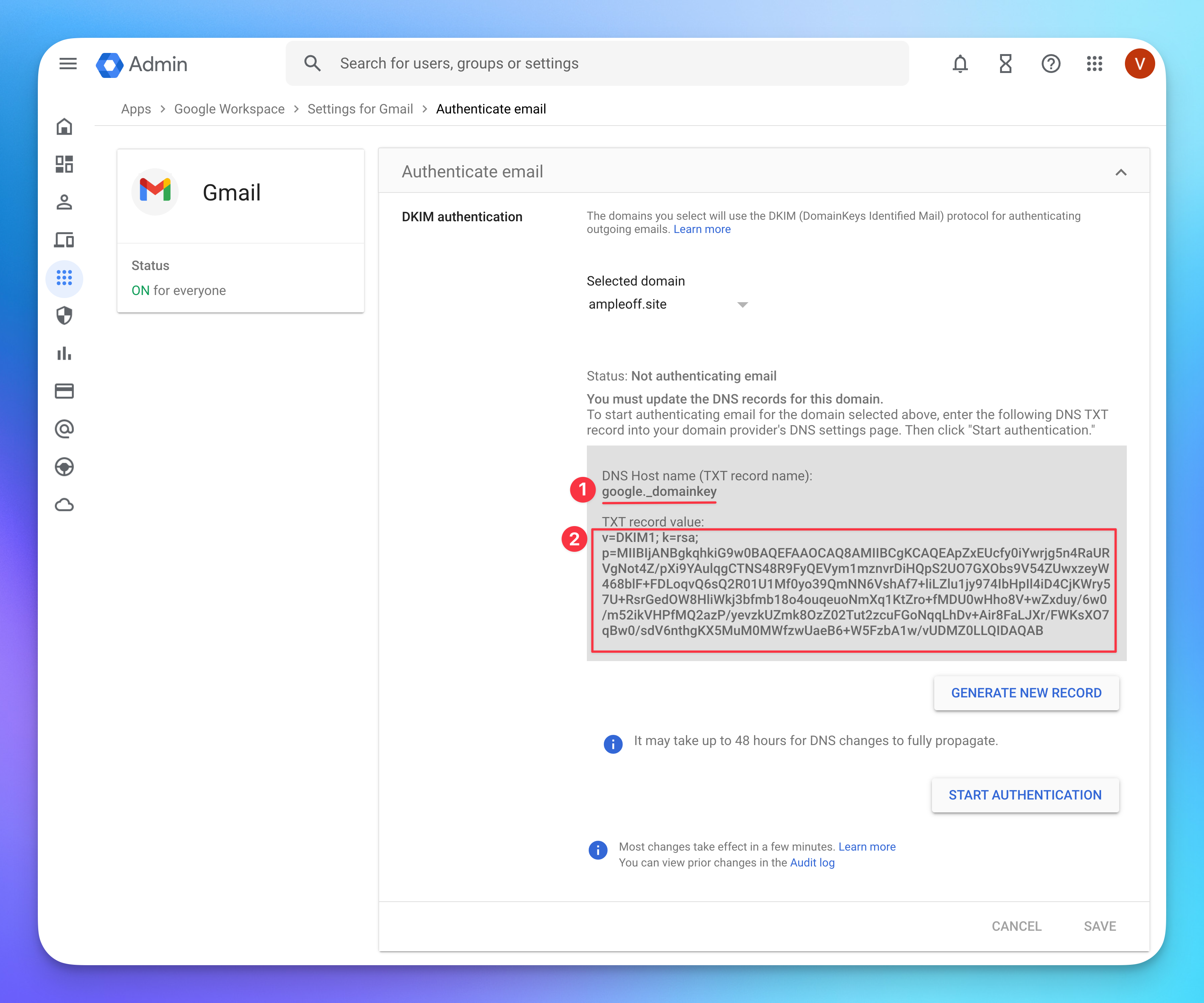
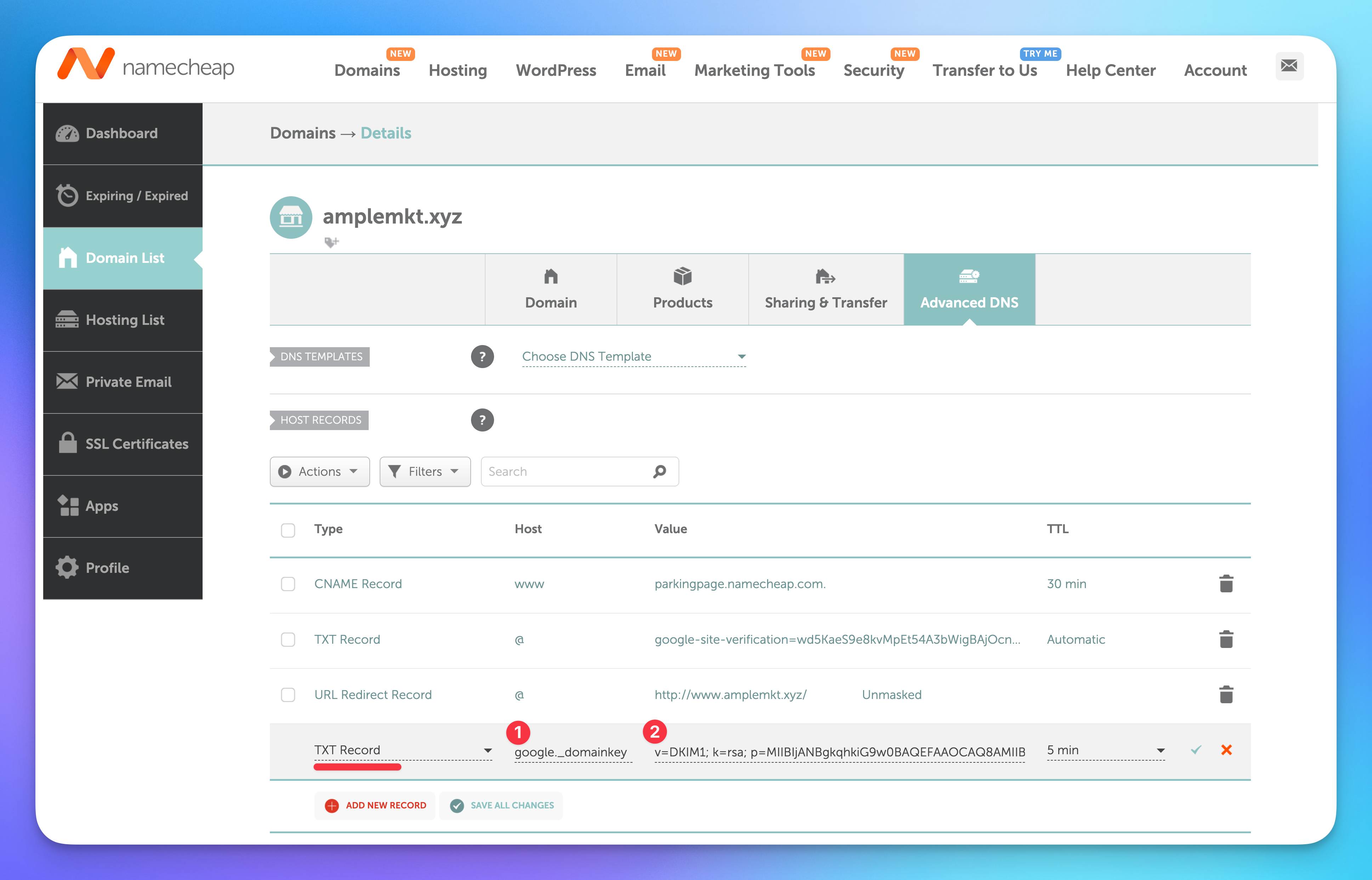
- Save the new record in Namecheap
- Go back into Google Workspace and press START AUTHENTICATION
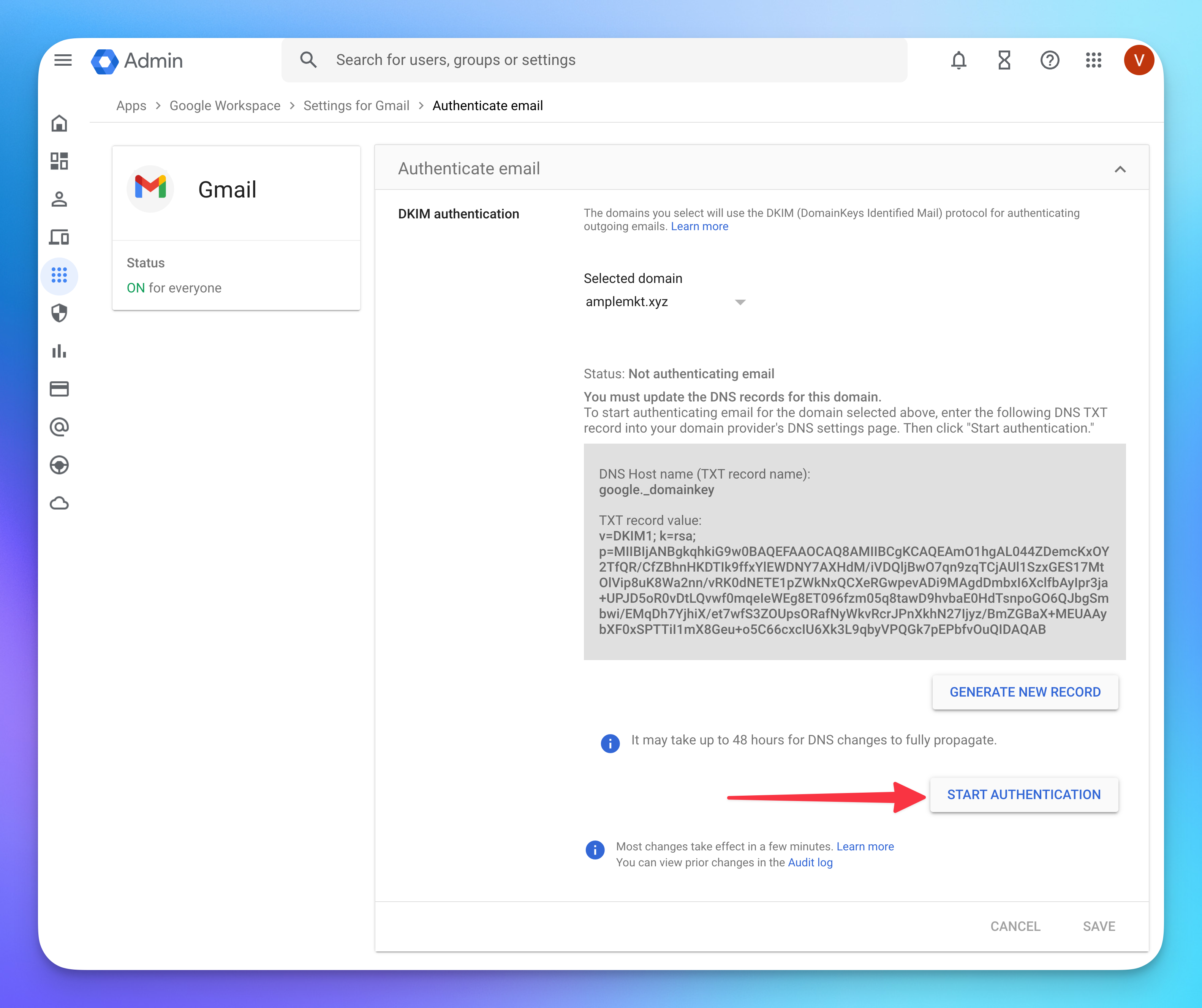
- START AUTHENTICATION may fail as it can take a couple of minutes (at worst hours) for Google to recognize the new DNS records you just created. Please try again if that's the case.
- The setup is now complete, move to the next section to validate it.
Step 4: Validate you DKIM setup
If the validation fails, it may be because DNS changes can take a while to propagate. Try again in a couple of minutes.
Within Amplemarket
- Go to the Domain Health Center
- Find a mailbox for the domain you just configured, and press the Authentication cell
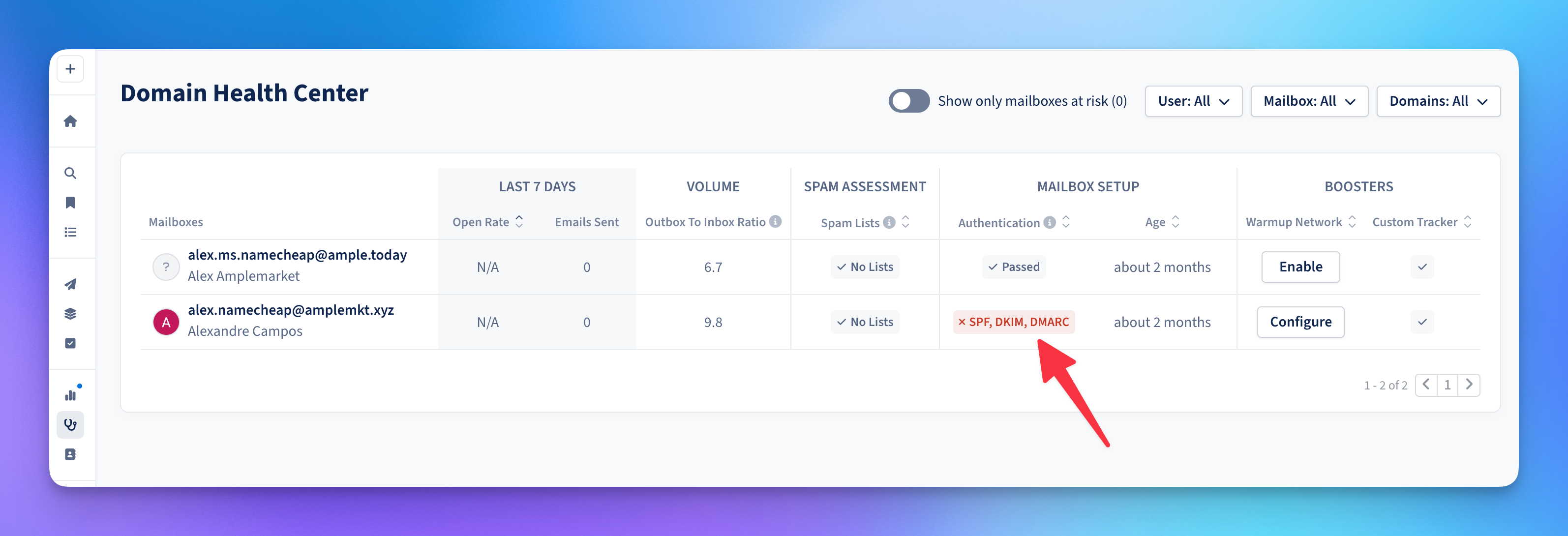
- Press Run tests to run an Authentication check
- Once completed, the DKIM should now show as pass
Outside Amplemarket
If you don't have access to Amplemarket you can verify if your DKIM is correctly setup on a free tool like: https://mxtoolbox.com/dkim.aspx
Use google as the selector value

Common DKIM Error Cases
Malformed DKIM Records
This means the DKIM record has an incorrect format, usually caused by mistakenly adding an extra character. Please double check your records, and/or copy/paste them again.
Email body altered after DKIM signature
This can happen when there's special configurations on your email servers to change outgoing emails. It's best to contact your IT department with this issue, since it will affect deliverability.
DKIM Signed from different domain
Your emails have a DKIM signature that did not originate from your domain. This means you haven't performed the DKIM setup for your domain, go to the DKIM setup section of this guide.
DKIM Signed with default Google signature
Google automatically signs all outgoing email with their default DKIM signature.
If you'd like to have an optimal setup for deliverability you can go to the DKIM setup section of this guide, to set up a DKIM signature coming from your domain.
DKIM Signature did not match
Your DKIM record is outdated and it does match the one that Google is using.
Complete the steps in the DKIM setup section of this guide.
DMARC
Step 1: Find your Domain DNS management page on Namecheap.com
If you don't have access to the login credentials, share this guide with someone in your organization who does, usually the IT team, or the person that bought the domain.
You'll need access to the domain management page to set up SPF, DKIM and DMARC.
- Go to https://ap.www.namecheap.com/domains/list/, find your domain and press Manage
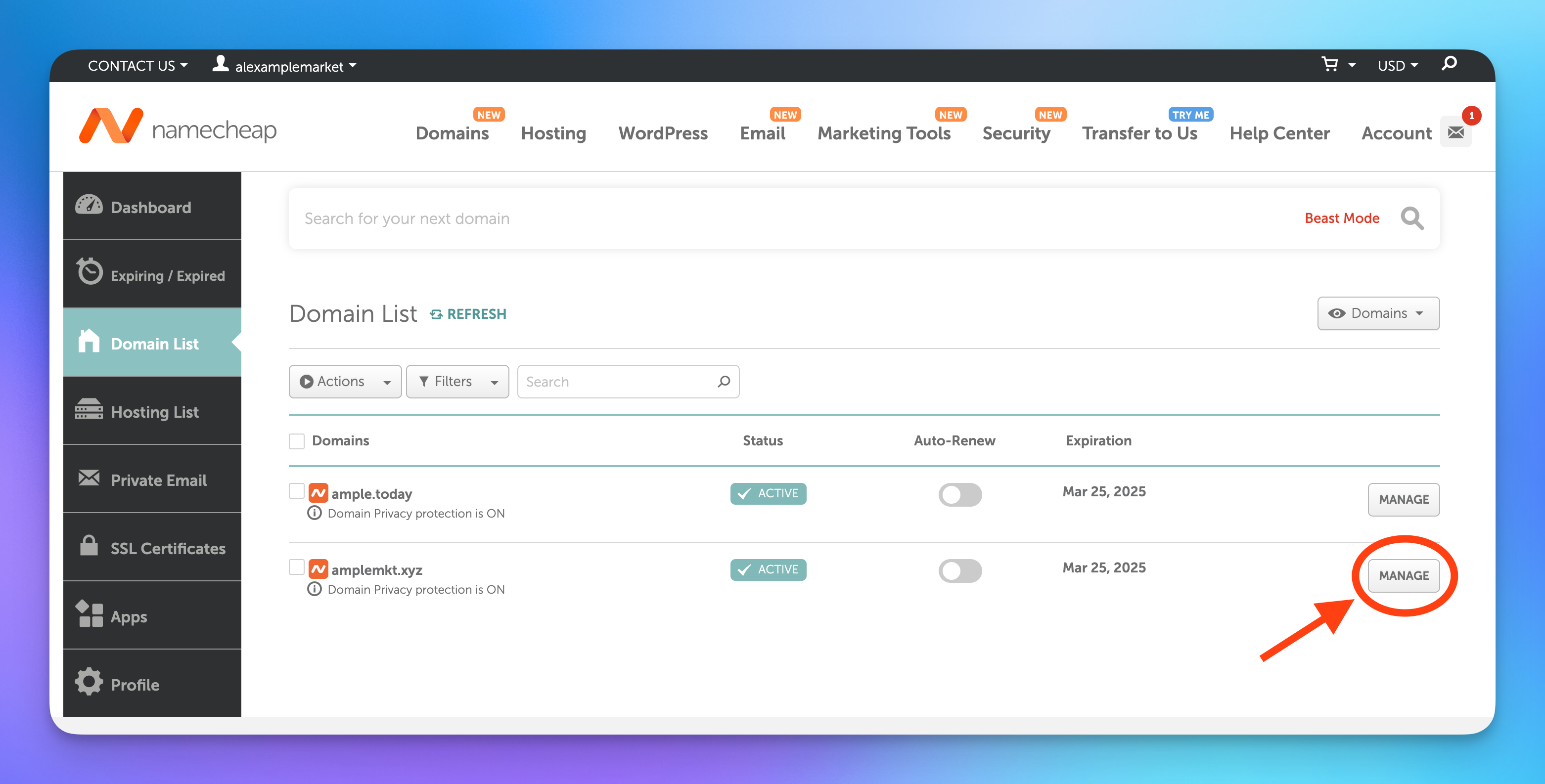
- Click on the Advanced DNS tab
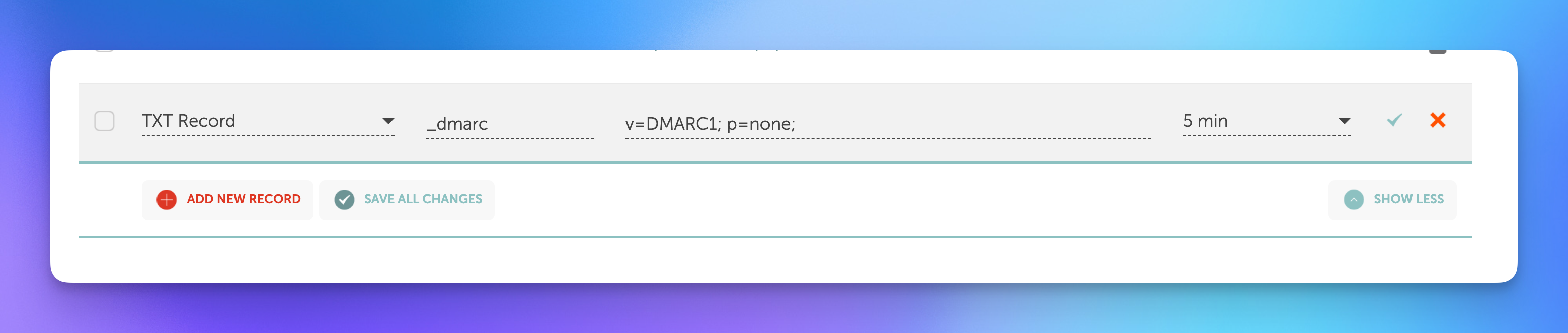
Step 2: Create a DMARC Record
- Press ADD NEW RECORD
- Add a new DMARC record and save changes
Type Host Value TTL TXT Record
_dmarc
v=DMARC1; p=none;
5 min
Step 3: Validate your DMARC setup
If the validation fails, it may be because DNS changes can take a while to propagate. Try again in a couple of minutes.
Within Amplemarket
- Go to the Domain Health Center
- Find a mailbox for the domain you just configured, and press the Authentication cell
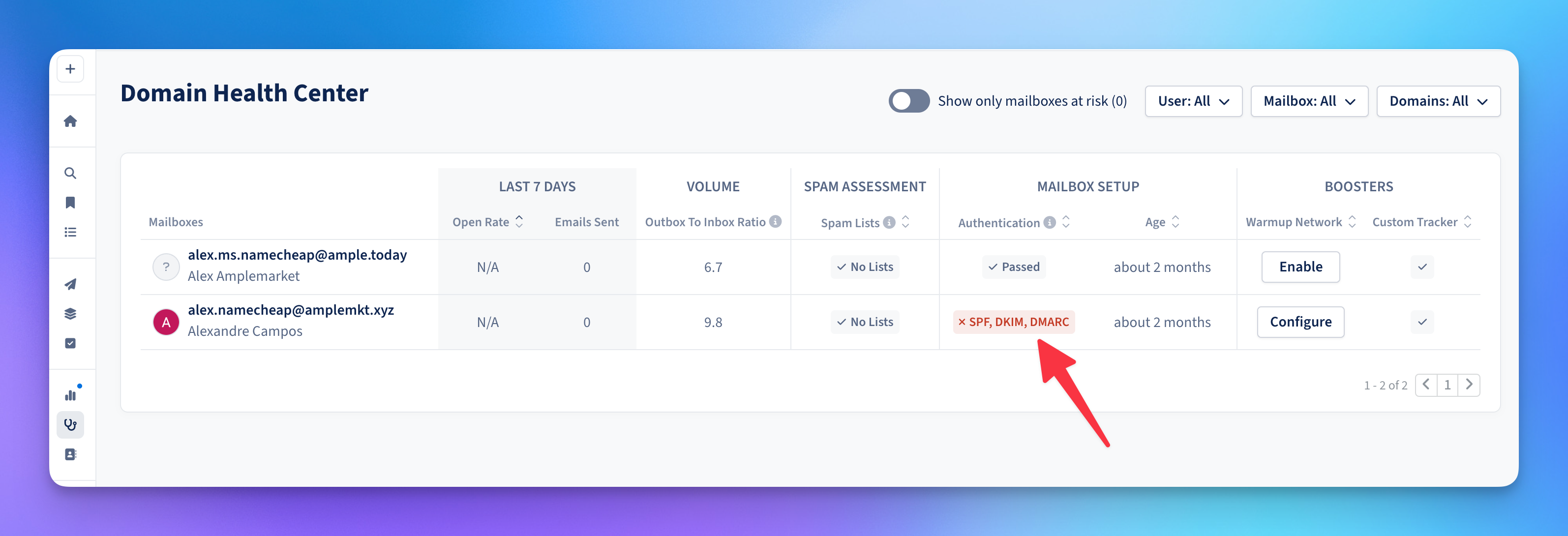
- Press Run tests to run an Authentication check
- Once completed, the DMARC should now show as pass
Outside Amplemarket
If you don't have access to Amplemarket you can verify if your DMARC is correctly setup on a free tool like: https://mxtoolbox.com/dmarc.aspx
Common DMARC Error Cases
Multiple DMARC Records
Keep only one of records, delete the others.
DMARC records are TXT type records, with _dmarc on the Host option.
Malformed DMARC Record
This could be a typo or a misplaced element.
Copy and paste the record you have to this DMARC syntax checker to help you find the issue: https://vamsoft.com/support/tools/dmarc-policy-validator
Malformed Email on the rua and/or ruf option
Your DMARC record has a rua and/or ruf option with a malformed email address.
Please check the syntax of the email address.
Copy and paste the record you have to this DMARC syntax checker to help you find the issue: https://vamsoft.com/support/tools/dmarc-policy-validator