Signal - LinkedIn - Clicks on your company ads
Last updated: March 23, 2026
Overview
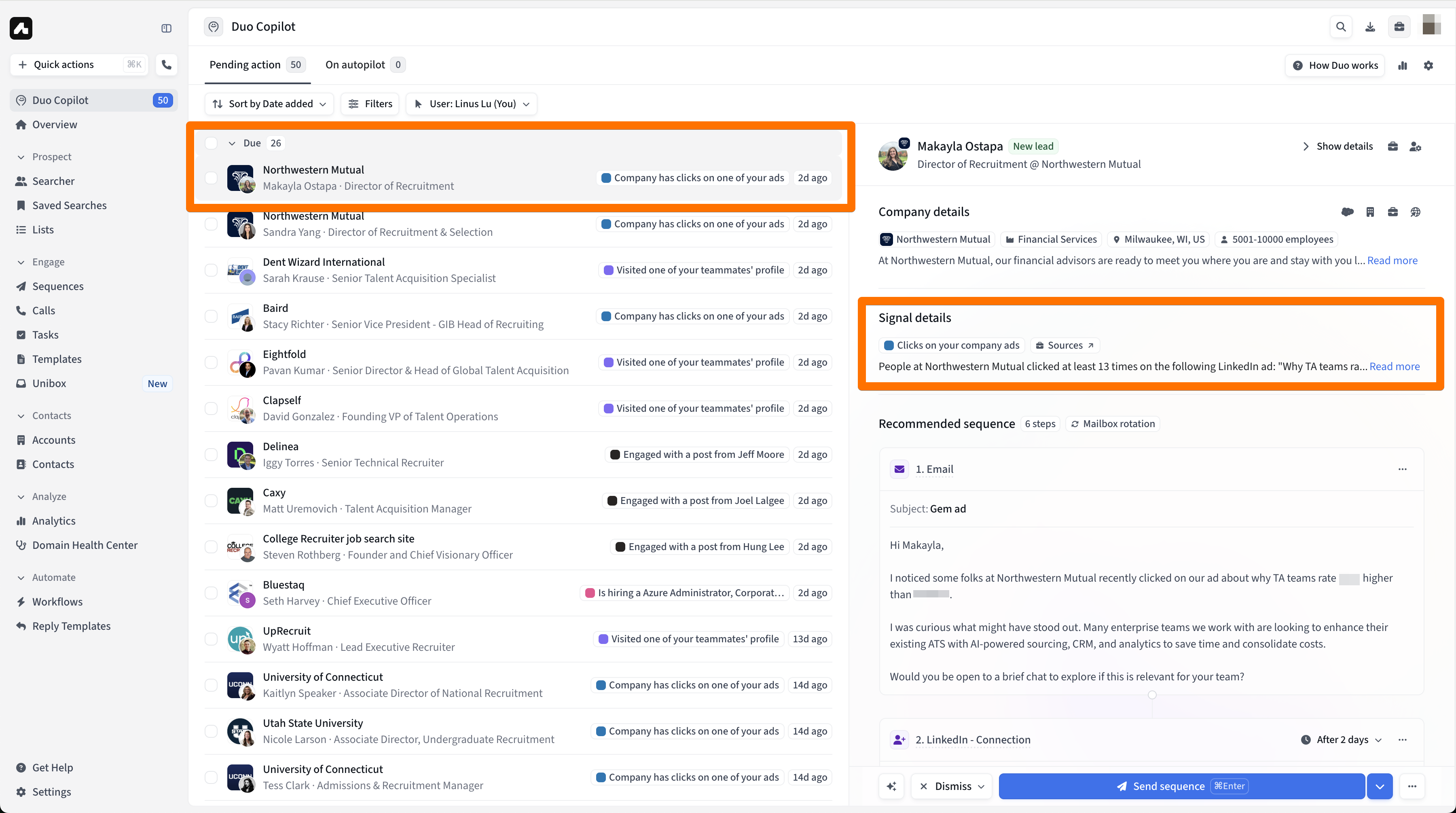
The Clicks on your company ads signal allows you to identify and target leads at companies that are actively engaging with your LinkedIn Ads. When employees at a company click on your ads, Duo automatically surfaces this as a buying signal, helping you focus on accounts that have already shown interest in your product or service.
Why it’s important
Engaging with your LinkedIn ads is a strong indicator of interest. These companies might be actively researching solutions like yours and might have resonated with your ads. This signal allows you to:
Prioritize warm accounts: Focus your efforts on companies that are already familiar with your brand.
Increase relevance: Reach out with highly contextual messaging based on the specific ad they engaged with.
Gain a competitive edge: Act on buying signals in near real-time, getting to prospects while they are in an evaluation mindset.
Prerequisites
Before you can set up the signal, you need to ensure the following requirements are met:
Connected LinkedIn Account: At least one user on your Amplemarket team must have their LinkedIn account connected.
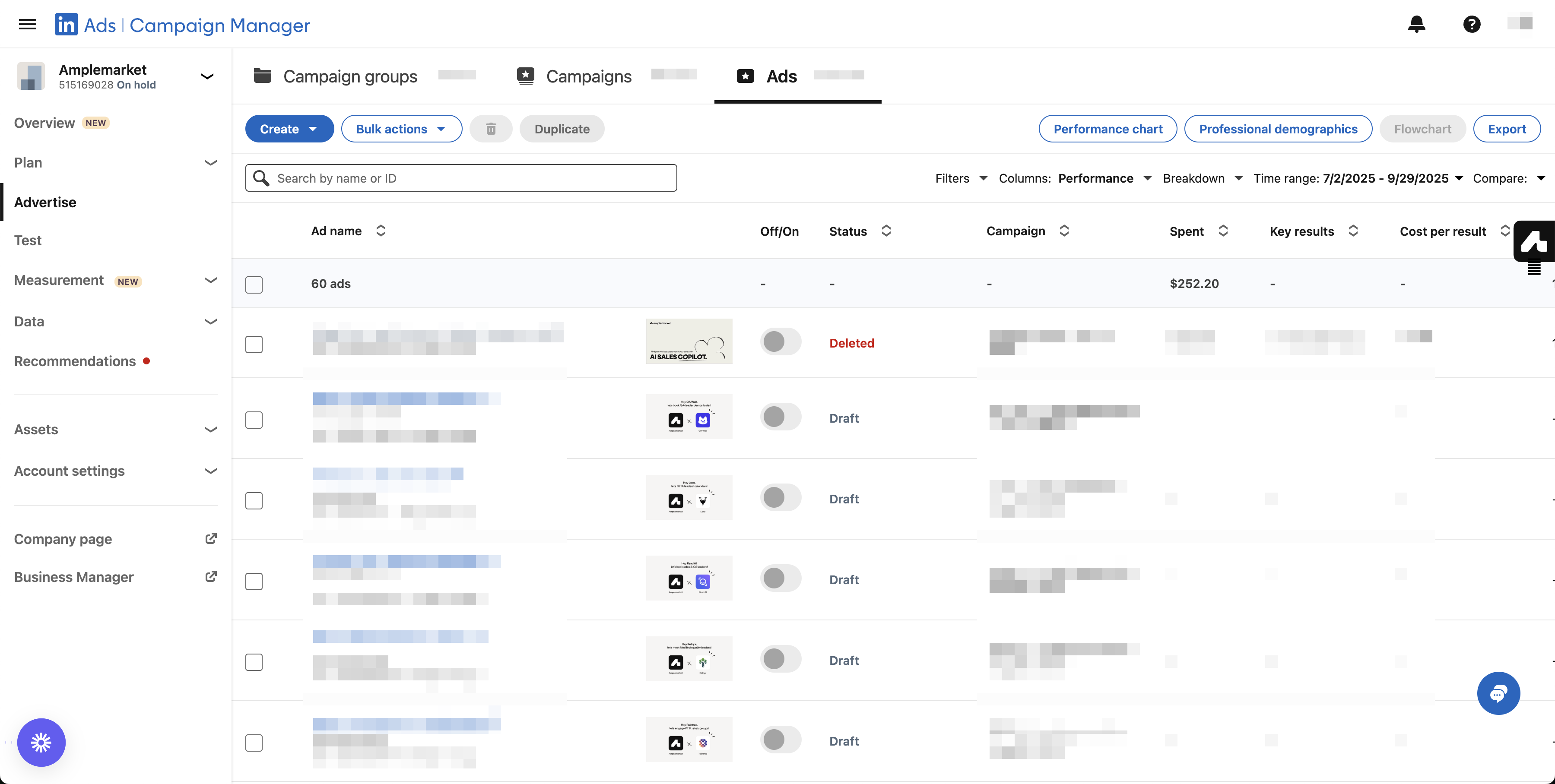
Campaign Manager Access: At least one of your users whose LinkedIn account is connected to Amplemarket must have the necessary permissions to the LinkedIn Ad account(s) you want to track in LinkedIn Campaign Manager, since this is where we extract signal data from.
Active Ad Campaigns: The signal tracks clicks from active ads, so you must have campaigns running in the ad account you wish to monitor.
Amplemarket uses the connected user's permissions to securely access ad performance data from LinkedIn's Campaign Manager.
How it works
This is a company-level signal. Here’s a breakdown of the process:
Data Source: We pull ad engagement data directly from LinkedIn Campaign Manager. This means we require continuous access to LinkedIn Campaign Manager via one of your users' connected LinkedIn accounts.
Ad-Level Tracking: The signal tracks clicks at the individual ad level, not at the campaign or campaign group level. This allows for very specific contextualization. You can see your ads in your LinkedIn Campaign Manager.
Company Identification: LinkedIn provides data on which companies have clicked your ads.
Note: LinkedIn's reporting typically only shows engagement from a company after it has clicked on a specific ad at least 3 times within a certain period.
Important Distinction:
LinkedIn reports ad clicks: The numbers you see in LinkedIn Campaign Manager (e.g., 290 clicks in 30 days) refer only to actual user clicks on your ads.
Duo’s signal shows total employees, not number of clicks: Since this is a company-level signal, LinkedIn only tells us which companies clicked, not which individuals. When Duo detects a company engaged with your ad, it pulls all employees from that company that match your filters (persona, seniority, title, etc.).
Example:
LinkedIn: “Company X clicked your ad three times (meeting the reporting threshold).”
Duo: “Company X has 10 employees who match your ICP, so we surface 10 leads.”
Lead Surfacing: Once a company is identified, Duo finds people within that company who match your specified filters (e.g., personas, titles, seniority) in the signal. The leads you see in your feed are not necessarily the individuals who clicked the ad, but rather relevant contacts at the engaged company.
Rich Context: Duo enriches each lead with crucial context to help you personalize your outreach, including:
The specific ad content they engaged with.
The total number of clicks from that company.
Details about the ad campaign.
How to set it up
1. Create a New Signal
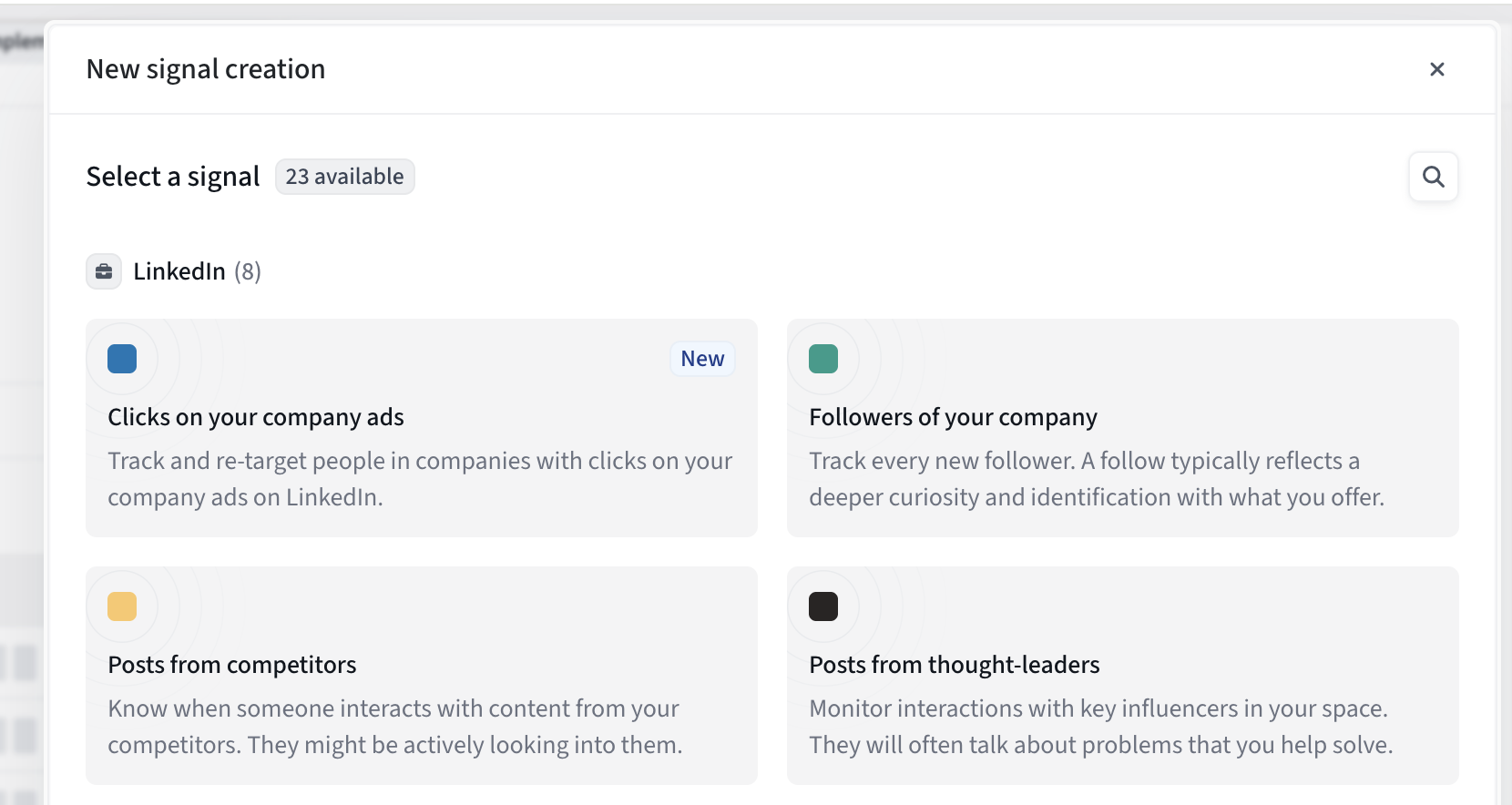
Navigate to Settings > Duo Copilot > Signals and click New signal. In the LinkedIn section, select Clicks on your company ads.
2. Configure the Signal
This will take you to the main configuration screen:
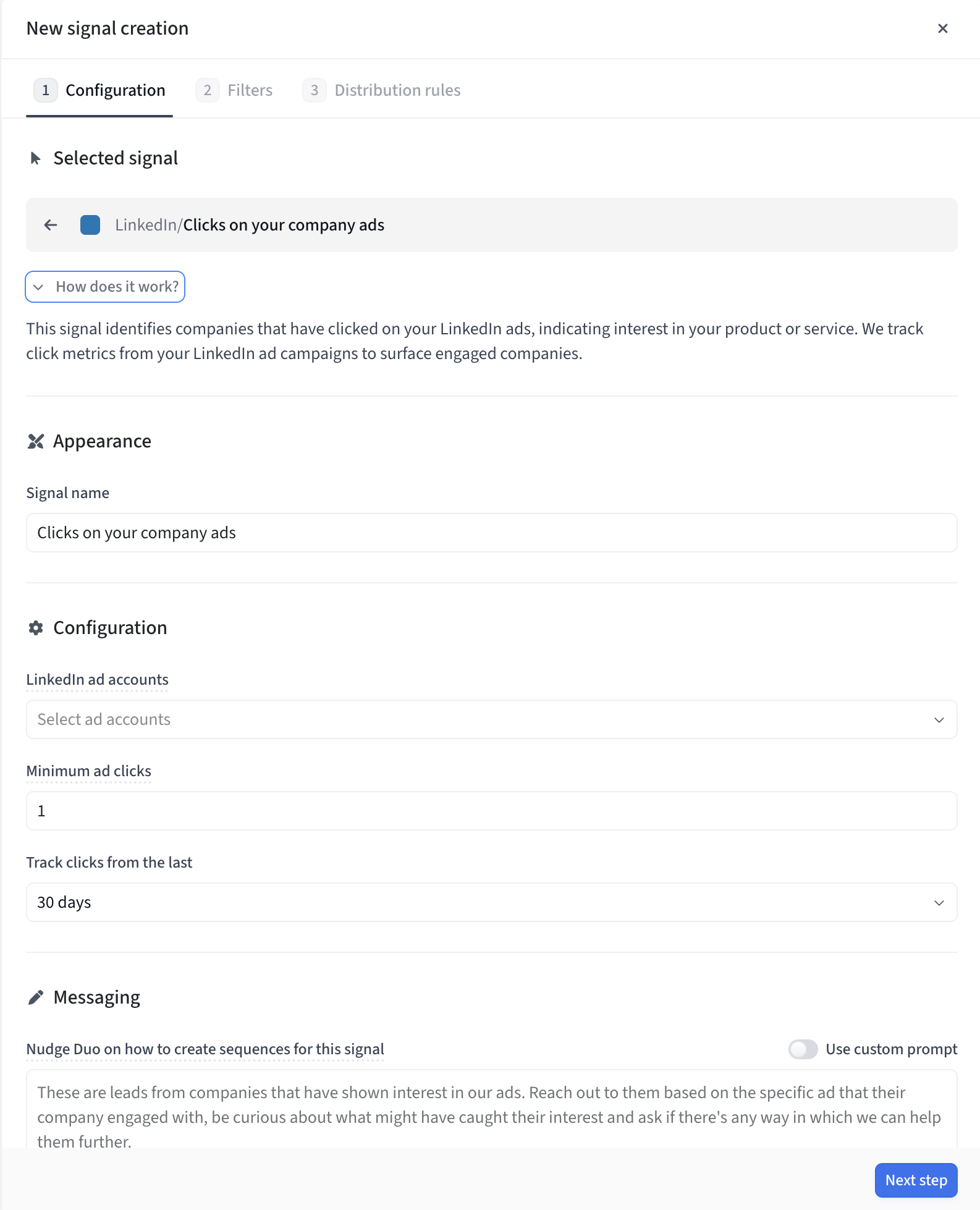
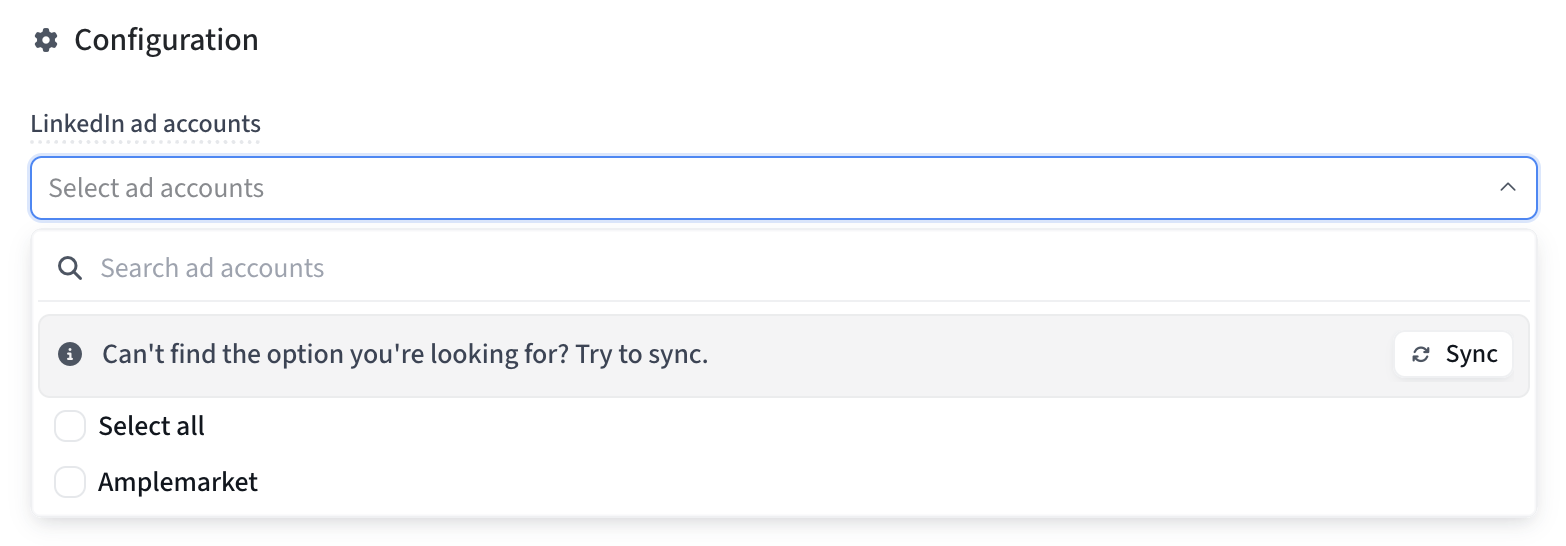
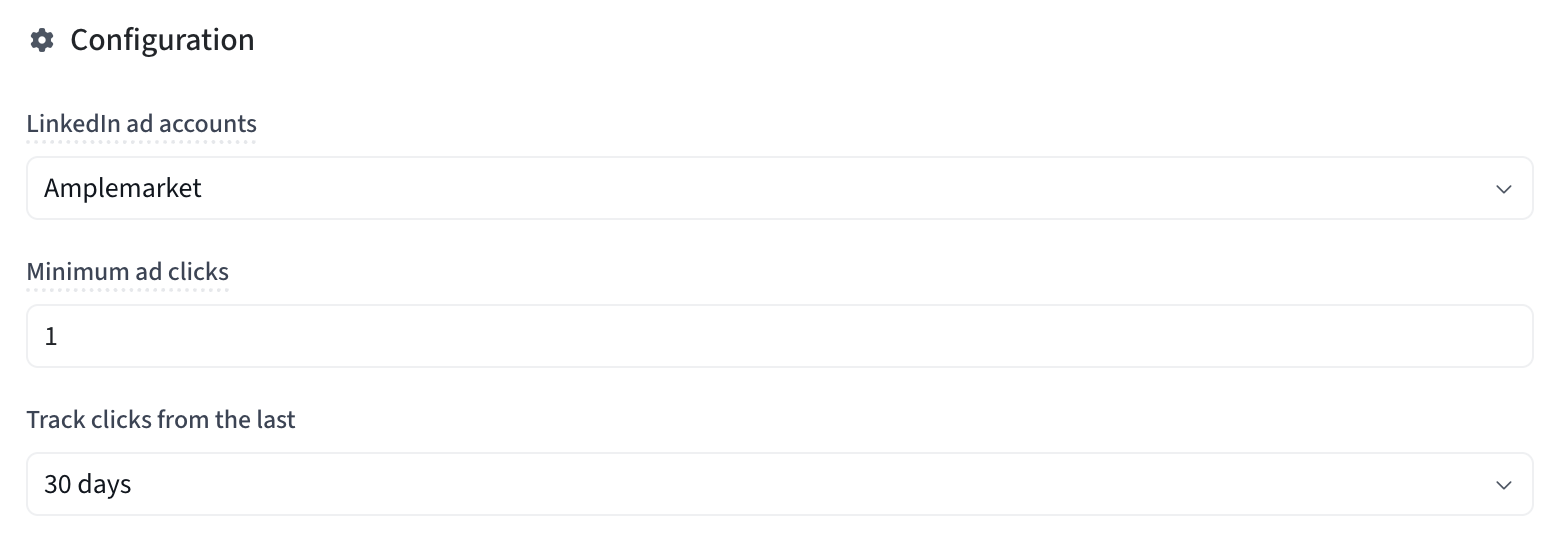
LinkedIn ad accounts: Select the LinkedIn ad account(s) you want to monitor. You must have a team member with access to LinkedIn Campaign Manager connected to Amplemarket. If you don't see the account you're looking for, use the Sync button to refresh the list.
Minimum ad clicks: Set the minimum number of clicks from a single company on an ad before a signal is triggered. The default is 3, which matches LinkedIn's minimum reporting threshold.
Track clicks from the last: Define the lookback period for tracking clicks (e.g., 30 days).
3. Set Filters & Distribution
Click Next step to apply filters (to define who you want to target within the engaged companies) and set up distribution rules for your team. Once done, click Create signal.
What to Expect
Once configured, you will start seeing leads from this signal in your Duo Copilot feed.
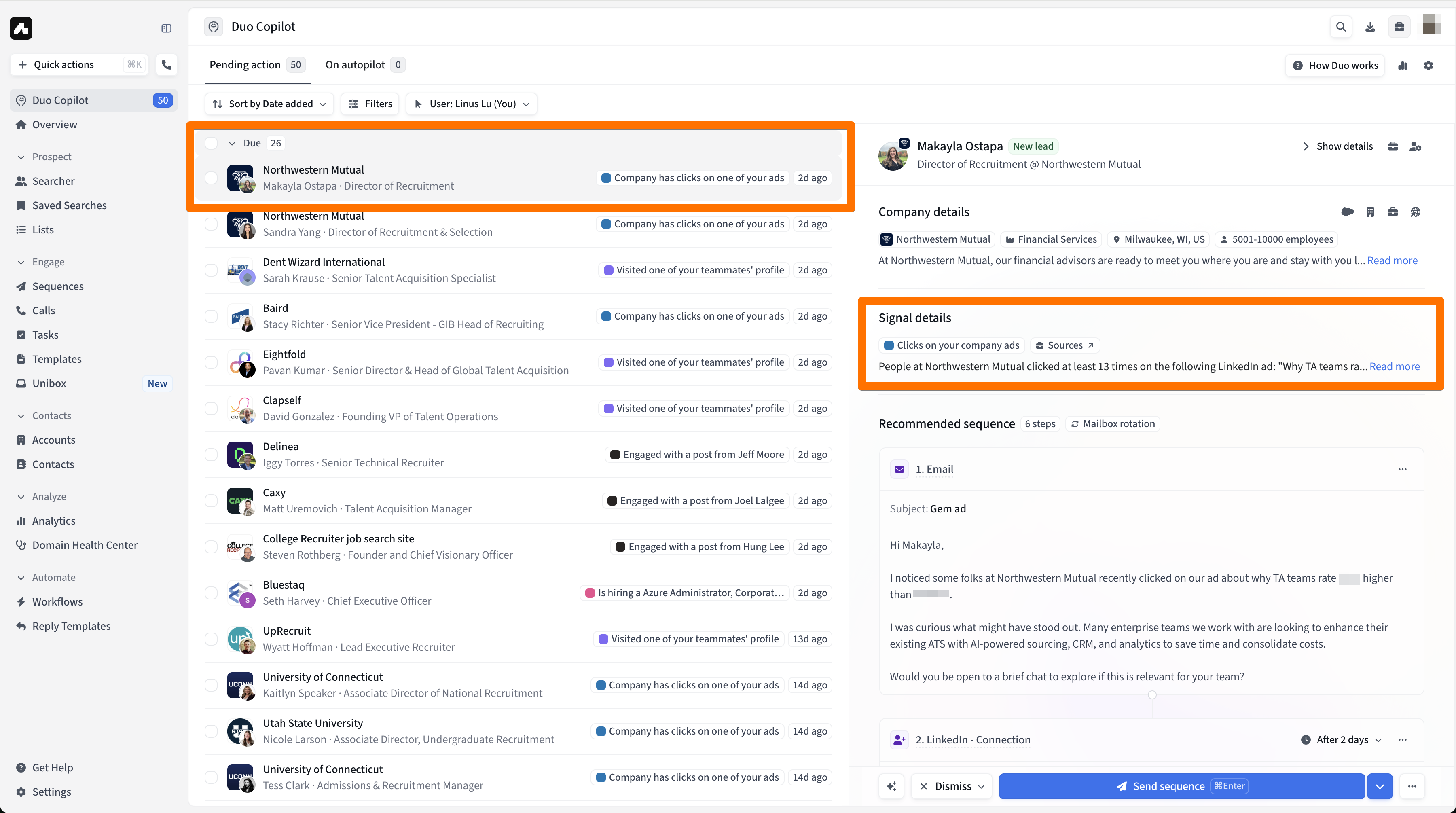
When you open a lead, you will see the Signal details, including which ad the company clicked on and how many times, along with an AI-generated recommended sequence that uses this context.
Frequently Asked Questions (FAQ)
Why can't I see any LinkedIn ad accounts in the setup dropdown?

This might happen because:
No one on your team has connected their LinkedIn account to Amplemarket.
The connected LinkedIn accounts do not have Campaign Manager access to any ad accounts.
Your access to ad accounts is done via a Business Manager profile. If that's the case follow these steps so that we can access your ad accounts:
Click on your profile picture in the top right and click on your company business manager profile.
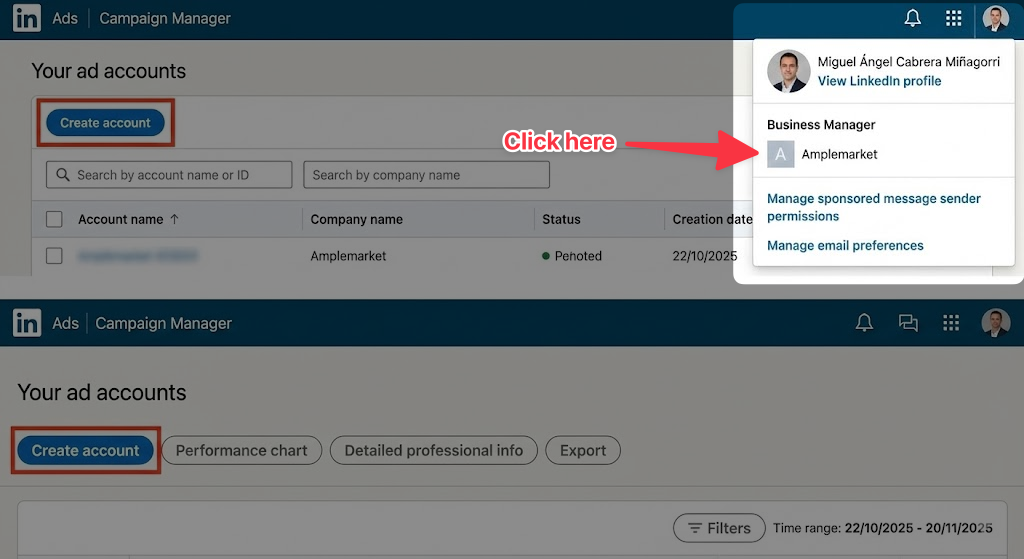
Once the above is done, wait a few seconds (~30 seconds) and you should be able to return to Amplemarket and sync your ad accounts again.
I've set up the signal, but I'm not getting any leads. What could be wrong?
There are a few common reasons this might happen:
Low Ad Engagement: There may not be enough clicks on your ads from identifiable companies to trigger the signal.
LinkedIn's Threshold: LinkedIn typically only reports on company engagement after a company has clicked on a specific ad at least 3 times.
Restrictive Filters: Your signal's persona filters might be too narrow, preventing Duo from finding matching contacts at the companies that did click your ads.
Permissions Issue: The team member with Campaign Manager access may have disconnected their LinkedIn account from Amplemarket or had their permissions revoked in LinkedIn. In this case, you should see a warning on your ads signal in your signal list in Duo Copilot > Signals.
Are the leads I get the exact people who clicked on the ad?
Not necessarily. This is a company-level signal. We identify the company that engaged with your ad, and then Duo finds and suggests relevant people at that company who match your filters.
How often does the data refresh?
The data is not real-time. Amplemarket syncs with LinkedIn Campaign Manager periodically throughout the day to fetch the latest ad engagement data.
What happens if the team member with access disconnects their LinkedIn account?
The signal will stop working, as Amplemarket will lose its ability to pull data from LinkedIn Campaign Manager. It's important to ensure continuous access through at least one connected team member with the right permissions.