Parallel Dialer Overview
Last updated: August 18, 2026
Amplemarket's Parallel Dialer helps sales reps reach more live conversations by calling multiple prospects at the same time.
With regular dialing, you call one prospect, wait for them to answer, and then move to the next call. A lot of that time can be spent listening to ringing, reaching voicemail, or hitting busy and unanswered numbers.
Parallel Dialer handles that waiting for you. It calls several prospects simultaneously, identifies what happens on each call, and connects you when a real person answers. The remaining calls are automatically stopped so you can focus on one conversation at a time.
The goal is simple: spend less time dialing and waiting, and more time talking to prospects.
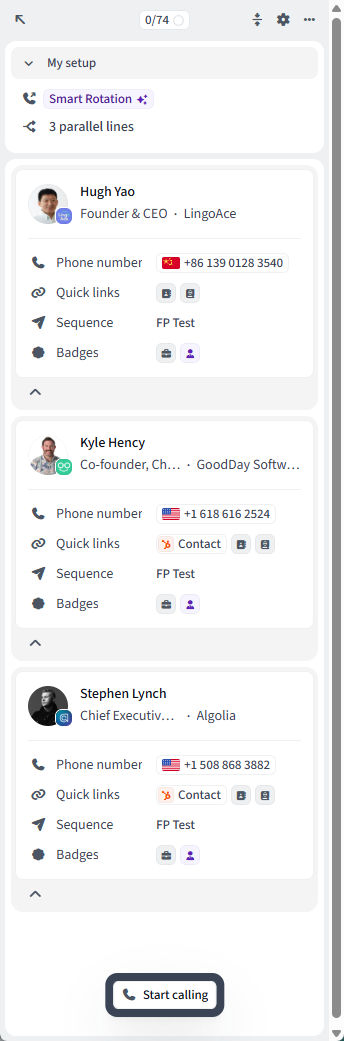
How Parallel Dialer works
Parallel Dialer works directly from your Amplemarket call tasks. When you start a dialing session, Amplemarket takes the eligible call tasks in your queue and starts calling multiple prospects at the same time.
A typical round looks like this:
1. Multiple prospects are called
Instead of calling one prospect at a time, Amplemarket starts several calls in parallel based on your selected number of dialing lines.
We generally recommend starting with 2–3 parallel lines.
2. Amplemarket monitors each call
While the calls are happening, Amplemarket determines what is happening on each line.
For example, a call might:
Keep ringing
Reach voicemail or an answering machine
Be busy
Fail or not answer
Reach a real person
You don't need to manually manage these calls.
3. A real person answers
When Amplemarket detects a live person, that prospect becomes the active call.
You'll hear the connection and move directly into the conversation using the same Amplemarket calling experience you're already familiar with.
4. The other calls are stopped
As soon as one prospect becomes the live conversation, the other calls that are still happening in parallel are automatically dropped.
You are never expected to manage several conversations at once.
5. You have the conversation
During the call, you still have access to the prospect and company context you normally use in Amplemarket.
Your focus is now entirely on that one conversation.
6. Log the outcome and continue
Once the conversation ends, log the appropriate call disposition and notes as you normally would.
Your existing Amplemarket task and Sequence behavior continues to apply, and you can move straight into the next round of calls.
The overall flow is:
Call tasks → multiple calls → live person detected → connect rep → stop remaining calls → conversation → disposition → continue dialing
How many people are called at the same time?
Your Parallel Dialer can be configured to call multiple prospects simultaneously.
We generally recommend starting with 2–3 lines at a time. More lines do not always mean better results, and dialing too aggressively can affect caller-ID reputation and the prospect experience.
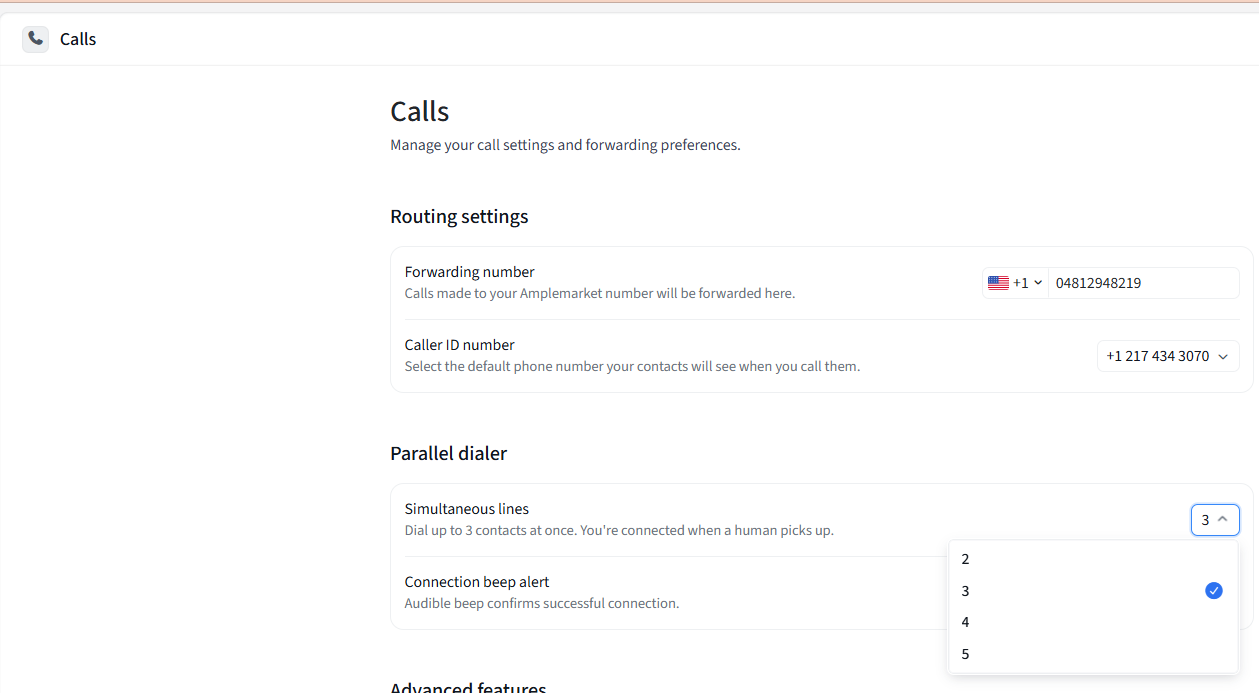
You can control the number of parallel calls in two places:
From your user-level Calls settings, which sets your default number of parallel lines.
Directly from the task execution window before starting a Parallel Dialing session, if you want to adjust the number of lines for that specific calling block.
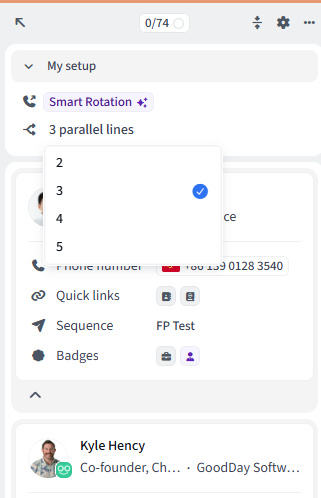
This gives reps a sensible default while still allowing them to adapt the dialing intensity for each session.
Which phone number does Amplemarket use?
Parallel Dialing works with your existing Amplemarket calling numbers and Smart Rotation.
When multiple caller IDs are available, Amplemarket automatically tries to select the most appropriate number for each prospect based on factors such as location and number availability.
When dialing multiple prospects at once, Amplemarket can also use different eligible caller IDs instead of sending every simultaneous call from the same number.
This helps distribute calling activity and protect the health of your phone numbers.
What happens when someone doesn't answer?
Amplemarket automatically handles common call outcomes such as:
No answer
Busy
Voicemail or answering machine
Failed calls
Calls canceled because another prospect answered first
When a real person answers, that conversation becomes the active call and the other calls are stopped automatically.
Can I still use my normal Amplemarket workflow?
Yes.
Parallel Dialing is designed to work with your existing call tasks, filters, phone numbers, dispositions, sequences, and call analytics.
You can still filter your tasks before dialing — for example by Sequence, local time, account, or other criteria — and your connected conversations follow the normal Amplemarket call workflow.
Parallel Dialer access and pricing
Parallel Dialer is a paid Amplemarket add-on and is not automatically included with every Amplemarket subscription. It is sold per user / seat.
At a high level:
Your company purchases Parallel Dialer seats for the users who need the feature.
Only users assigned a Parallel Dialer seat can access Parallel Dialing.
There is no additional per-minute Parallel Dialer usage charge.
Parallel Dialer seats include an allowance for calling phone numbers.
The exact commercial terms and number allowance depend on your company's Amplemarket agreement.
You don't need to enable Parallel Dialer for everyone on your team. For example, a company may choose to purchase seats only for SDRs who regularly run high-volume calling blocks.
If you'd like to add Parallel Dialer to your Amplemarket account, contact your Amplemarket Account Manager. They can share pricing for your team and help determine the right number of seats and calling-number setup.
Before your first Parallel Dialing session
A good Parallel Dialing setup starts with a few basics:
Make sure the users who will be dialing have Parallel Dialer seats.
Make sure they have appropriate calling numbers for the countries they target.
Configure your calling and Do Not Call settings.
Check that your microphone and audio devices are working.
Prepare the call tasks you want to work through.
Start with 2–3 parallel lines.
From there, Parallel Dialer handles the complexity of running multiple calls while keeping the rep experience focused on the thing that matters most:
the next live conversation.