Dialer: Business profile and US call verification (STIR/SHAKEN)
Last updated: April 2, 2026
Summary:
Trust Hub lets you register a business profile so your organization's US Amplemarket dialer numbers can receive STIR/SHAKEN level A attestation from carriers. That can reduce spam labeling and improve the chance calls are answered. Review is handled by our voice provider (Twilio); Amplemarket then enrolls your eligible numbers automatically.
The approval process only needs to be completed once and it takes effect for the whole organization.
Who can submit a business profile?
Users with permission to manage dialer Trust Hub (your admin can grant this in role settings).

If you do not see a Trust Hub tab under Dialer in Settings, your role may not include access to this page.
Why register a business profile?
Outbound calls from US numbers can be labeled as spam or "unknown" depending on the recipient's carrier and policies. STIR/SHAKEN is a set of standards used in the United States to cryptographically attest that a call is associated with a verified business identity.
After your business profile is approved, Amplemarket automatically enrolls your US Twilio numbers in the appropriate trust registration so outbound calls can carry that verification where carriers support it.
Important: Carrier behavior varies. Verification improves trust signals but does not guarantee a specific label on every phone or network.
Where to start
Go to Settings.
Open Dialer.
Select the Trust Hub tab.
Click Start verification and complete the form.
Form data
Business and address
Legal business name
Country and full address (street cannot be a P.O. box; apartment/suite is optional)
City, state/province/region, postal code
Business details
Business type (e.g. corporation, LLC)
Business registration ID type and registration number (formats depend on the ID type you choose; US EIN is one supported option)
Industry
Website URL (optional in the form but recommended when you have one)
Regions of operation (geographic regions where you do business)
Social media profile URLs (optional)
Authorized representative (someone who is a current, publicly verifiable employee):
First and last name
Email
Phone number
Business title and job position
Use accurate information, Twilio will use it to validate your company and you're liable for the information you submit.
What happens after you submit?
Once a profile is approved, it may take a couple of days until STIR/SHAKEN attestation goes into full effect
Review: Twilio reviews your business profile. This usually takes a few days (timing is not guaranteed).
Notifications: You will be emailed when the profile is approved or rejected.
US numbers: Once approved, your workspace's US dialer numbers (Twilio) are automatically associated with the verification program. New US numbers you add later are also enrolled when your trust registration is active—no extra step in Trust Hub.
Statuses you may see
Status | What it means |
Pending review | Submitted; waiting on the provider. |
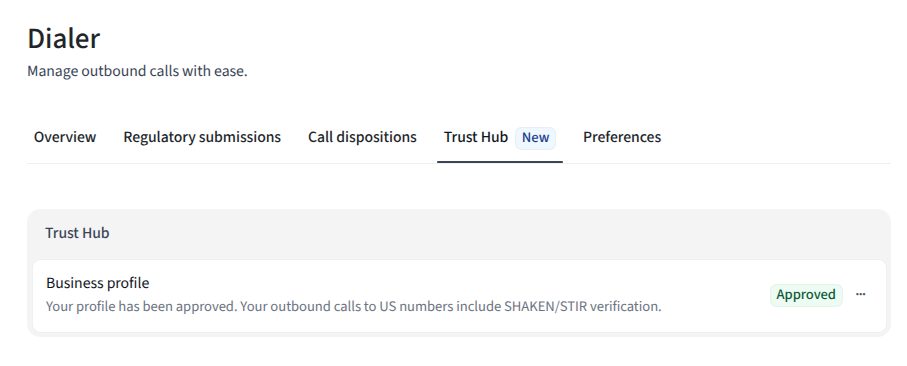
Approved | Profile accepted; US numbers are enrolled for verification as described above. |
Rejected | The provider did not accept the submission. Use Get Help in the product or contact Support for next steps. |
Updating or removing your profile
Approved: You can Update the business profile to submit changes, in which case you will lose STIR/SHAKEN attestation until the changes are approved.
Rejected: You can Resubmit after correcting information, or contact support if you are unsure what to change.
Delete: You can remove the request from Trust Hub; you would need to start over if you want verification again later.
Frequently asked questions
Is this only for US numbers?
Enrollment in this flow applies to US numbers calling other US numbers on your Amplemarket dialer. The business may be international; the regions of operation field reflects where you operate.
Does this set a custom caller ID name (CNAM)?
This feature is focused on STIR/SHAKEN verification for US calling, not on configuring a display name on recipients' phones.
Who actually reviews my data?
Your submission is reviewed by Twilio (Amplemarket's telephony provider) and Amplemarket, for regulatory/trust compliance.
Does this apply to numbers that I registered as verified caller IDs?
No, this only applies to US numbers you obtained via Amplemarket, not your own numbers. Verified caller IDs get, at most, level B.
What's the attestation level provided without an approved business profile?
The default level is B.
Need help?
If your profile is rejected or something in Trust Hub is unclear, contact Amplemarket Support (or use Get Help from the Trust Hub menu when available).