Call Recording Rules & Two-Party Consent
Last updated: November 24, 2026
Call recording laws can vary depending on where your prospects are located. To help your team manage these requirements, Amplemarket lets workspace admins restrict call recording in specific US states, Canadian provinces, and countries.
You can choose to:
Never record calls in selected regions.
Record only your team's audio in selected regions, without recording the prospect.
Keep normal recording behavior everywhere else.
These settings apply across your workspace and help you manage your organization's call recording policies without relying on each rep to manually change their recording preferences.
Important: Recording laws vary by location. Amplemarket provides these controls to help you manage recording preferences, but your organization is responsible for complying with applicable recording laws and obtaining any required consent. We recommend consulting your legal team when configuring these settings.
How to configure recording restrictions
Only workspace admins can manage location-based recording restrictions. Once saved, the rules apply to your team's calls.
Step 1: Open your Dialer settings
Go to Settings → Dialer.
Open the Preferences tab.
Under Call automation, find Restrict recording by location.
Click Manage regions.
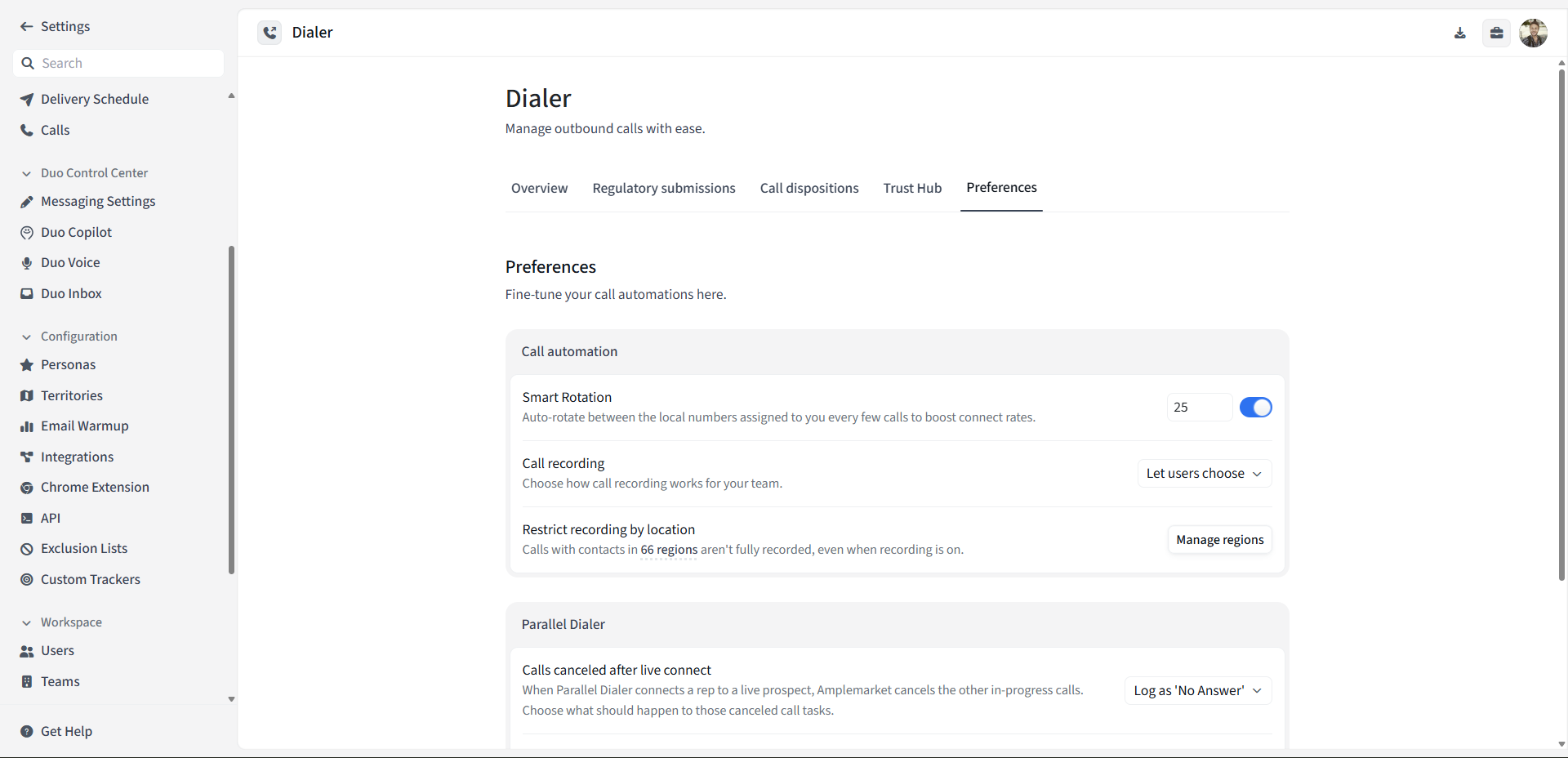
This opens the Manage restricted regions panel, where you can configure recording rules for the United States, Canada, and other countries.
Note: Location-based restrictions only apply to calls that would otherwise be recorded. If call recording is already disabled for your workspace or a rep, enabling a regional restriction won't turn recording on.
Step 2: Choose your recording preferences for the United States and Canada
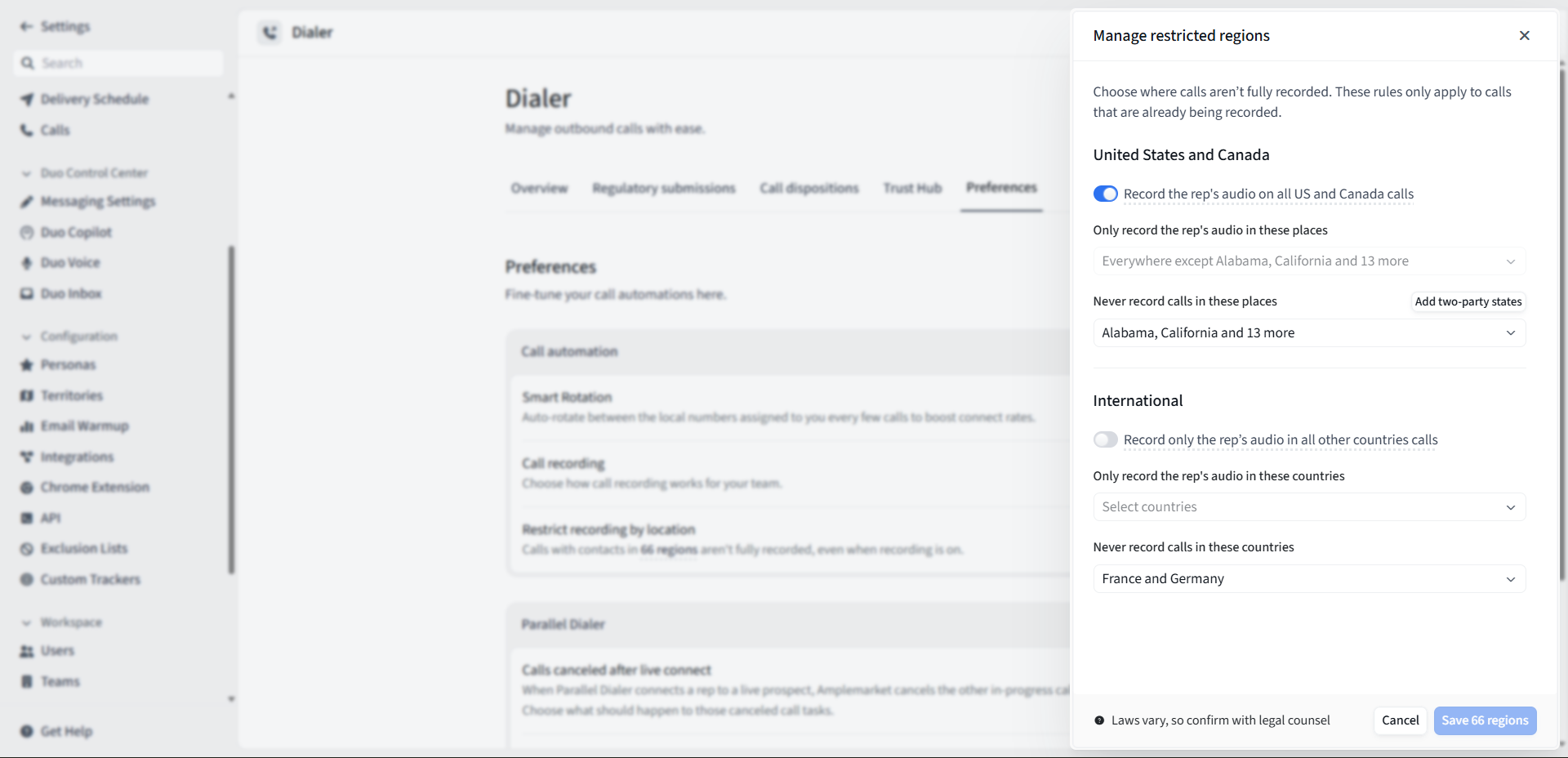
Under United States and Canada, you can configure three options:
1. Record the rep's audio on all US and Canada calls
Turn this on if you want to record only your team's side of every call to US and Canadian numbers.
The prospect's audio won't be included in the recording.
You can still choose specific states or provinces where calls should never be recorded. Those restrictions take priority.
2. Only record the rep's audio in these places
Select the US states or Canadian provinces where you want to record only your team's side of the conversation.
This is useful when you want different recording behavior across regions without applying the same restriction everywhere.
3. Never record calls in these places
Select the states or provinces where you don't want calls to be recorded at all.
You can search for locations by name or area code to find them more easily.
Add two-party states
You can also click Add two-party states to quickly select a suggested list of US states with stricter or potentially more complex recording-consent requirements.
Those states are: California, Connecticut, Delaware, Florida, Illinois, Maryland, Massachusetts, Michigan, Montana, Nevada, New Hampshire, Pennsylvania, and Washington.
Important: This is a suggested list, not a definitive legal classification. Recording requirements can vary, so we recommend reviewing the selected states with your legal team before saving. You can add or remove states to match your organization's needs.
Step 3: Configure recording restrictions for international calls
Under International, you have similar options for countries outside the United States and Canada.
You can:
Record only the rep's audio in all other countries, while making exceptions for countries where recording should be disabled entirely.
Only record the rep's audio in selected countries, if you want more specific restrictions.
Never record calls in selected countries, to prevent recording altogether.
For example, you might choose to never record calls to France and Germany while keeping your normal recording preferences for other countries.
Step 4: Review and save your settings
Once you've selected your regions, review the settings and click Save at the bottom of the panel. The button shows how many selections are included in your configuration.
Your saved restrictions will apply to your team's subsequent calls based on the region associated with the phone number being dialed.
You can return to Manage regions at any time to update your selections.
Understanding the different recording options
Recording restrictions affect not only the audio you can listen to, but also the transcripts and AI features available after a call.
Recording option | What happens |
|---|---|
Both sides recorded | The rep and prospect are recorded. Full transcripts, AI summaries, and other supported call insights can be generated. |
Rep's audio only | Only the rep's side is recorded and transcribed. AI summaries and coaching may miss important context from the prospect. Sentiment analysis is unavailable. |
Never record | No call audio is recorded. There won't be a call transcript, AI summary, or recording-based coaching insights. |
How recording restrictions affect your team
Location-based recording restrictions are managed by admins and take priority over your team's normal recording preferences.
For example:
If recording is enabled but the number being called belongs to a region you've set to Never record, the call won't be recorded.
If the region is set to Rep's audio only, only your team member's side of the conversation will be recorded.
If no location-based restriction applies, the call follows your normal Call recording settings.
When a call isn't recorded because of an admin restriction, reps will see an explanation in their call details.
For example:
Your admin turned off recording for contacts in California, so there's no recording, transcript or AI summary.
This helps your team understand why a recording or AI summary might be missing, even when recording is normally enabled.
Important information about recording consent
Amplemarket's location-based recording restrictions are designed to help you manage your organization's recording policies. However, there are a few important limitations to understand.
How does Amplemarket determine the location?
Amplemarket uses the country code and area code of the phone number being dialed to determine which recording restrictions apply.
For example, a US number with a California area code will be treated as belonging to California when applying your saved recording rules.
This doesn't necessarily mean the person is physically located in California. Someone may keep the same phone number after moving or answer a call while traveling.
Recording-consent requirements may depend on the actual location of the people participating in the conversation, not just the area code associated with their phone numbers.
Does this guarantee legal compliance?
Amplemarket's recording controls are intended to help you manage recording restrictions, but they don't guarantee compliance with recording-consent laws.
Your organization is solely responsible for understanding and complying with all applicable federal, state, provincial, local, and international recording laws, including obtaining the appropriate consent from participants.
We strongly recommend consulting your legal team before configuring call recording restrictions, particularly if your team operates across multiple regions.
Need help?
If you need help configuring recording preferences, contact Amplemarket support.
For questions about recording laws, consent requirements, or the right settings for your organization, please consult your legal team.