Amplemarket MCP
Last updated: October 8, 2026

What is MCP?
The Model Context Protocol (MCP) lets you connect AI assistants like Claude, ChatGPT, and Cursor directly to your Amplemarket account. Once connected, you can search for prospects, enrich contacts and companies, manage lead lists, check on your contacts' activity, and more — all through natural conversation with your AI assistant.
See the full list of currently available tools below. We're actively expanding our MCP capabilities. If you have feedback about a tool you think the MCP is missing, make sure to ping us via feedback.amplemarket.com.
What you can do with Amplemarket MCP?
Connect Amplemarket to your AI assistant and run your entire prospecting workflow in a single conversation.
Find and build lists
"Search for VP of Sales at SaaS companies in Europe with 50-200 employees, create a lead list, and enrich all of them."
Research accounts
"Tell me everything about Acme Corp including their contacts, engagement history, and recent signals."
Enroll leads into sequences
"Take the leads from my Q2 Outbound list and add them to my Enterprise Outbound sequence."
Create sequences from scratch
"Create a 3-step sequence with LinkedIn connection, follow-up message, then email and write the copy based on our value propositions."
Manage your tasks
"What tasks do I have due today?"
Get pipeline analytics
"How many leads did my team contact last month and what was the reply rate?"
Getting started
Prerequisites
Before connecting to the Amplemarket MCP, ensure you have:
An active Amplemarket account
An MCP-compatible AI client (Claude, ChatGPT, Grok Bot, Cursor, or any client that supports remote MCP servers)
Connecting to Amplemarket MCP
Amplemarket MCP uses OAuth authentication, so you can simply log in with your Amplemarket account. No API keys are required.
Claude
In Amplemarket, go to Settings → Integrations → Claude, then:
Click Connect to open the Add connector dialog with Amplemarket already filled in
Click Continue to proceed to the next screen
Click Add to connect. An auth popup will appear, click Approve request to finish
Adding custom MCP connectors in Claude requires a Pro, Max, Team, or Enterprise plan. We’re working on publishing Amplemarket to the Claude Connectors Directory, which will make it available on all plans.
For more details, see Claude’s guide on connecting MCP servers or check this Loom video:
Claude Team or Enterprise Plan
Before members of Team and Enterprise plans can use connectors, an Owner or Primary Owner needs to enable them for the organization. Enabling a connector makes it available to your team, but it doesn't automatically grant anyone access. Each person still needs to authenticate individually before they can use it.
Note: With Enterprise-managed auth, you authorize a connector once for your entire organization, and your team inherits access automatically on first login.
For more details, see Claude's guide on Connectors
ChatGPT
In Amplemarket, go to Settings → Integrations → ChatGPT, then:
Click Connect to open the official Amplemarket plugin page in ChatGPT
Click Install plugin. A popup will appear, click Sign in with Amplemarket
An auth popup will appear, click Approve request to finish
For more details check this Loom video:
Grok Bot & Cursor
In Amplemarket, go to Settings → Integrations → ChatGPT, then:
Click Connect to open the official Amplemarket plugin page on Cursor Marketplace
Click Add to Cursor. A popup will appear, click Add Plugin
An auth popup will appear, click Approve request to finish

Add as a custom connector
In your AI tool of choice, add the following URL as a custom MCP connector:
https://mcp.amplemarket.com/mcp
Choosing the right model
Choosing the right model
The Amplemarket MCP works with any MCP-compatible AI client. The capabilities of each model may impact the outcomes of the MCP tool usage, so choosing the right one can make a significant difference.
Recommended (best results)
Claude Opus, GPT (full/flagship version e.g. 5.5), Gemini Pro
These models handle complex workflows reliably: multi-step prospecting, sequence creation, inbox triage, analytics queries. If you are building an automation or using several tools in one session, start here.
Works for simple tasks
Claude Sonnet, GPT Mini, Gemini Flash
Good for straightforward single-tool calls like searching for people, adding leads to a list, or checking a sequence status. May struggle with longer workflows that require chaining multiple tools or interpreting ambiguous instructions.
Not recommended
Claude Haiku, GPT Nano, Gemini Flash Lite
These models are optimized for speed and low cost, not complex reasoning. They tend to misuse tools, miss steps, or produce incorrect outputs when working with MCP. Only suitable for very simple, well-defined single-step tasks. If you need to use one of these models, set the reasoning effort to high to improve results.
Authentication
Amplemarket MCP uses OAuth 2.0 for authentication. When you connect for the first time, a browser window will open where you can sign in to your Amplemarket account and approve access. No API keys are needed.
Each user authenticates individually — the MCP server accesses data based on your personal Amplemarket account permissions.
Supported Tools
Searcher
Tool | Description | Example Prompts |
| Search for people using the same filters available in Amplemarket Searcher — name, title, seniority, department, location, company, industry, company size, and more. Returns up to 100 results per page. | "Find VPs of Engineering at fintech companies in NYC" "Show me marketing directors at companies with 200-500 employees in Europe" |
| Search for companies by name, domain, industry, size, location, type, and more. Returns up to 100 results per page with company details including funding, tech stack, and headcount. | "Show me fintech companies in Europe with 200-500 employees" "Find B2B SaaS companies in San Francisco that have raised Series B+" |
| List saved searches visible to you, with optional filtering by owner or name. Lead counts are cached and refreshed daily. | "What saved searches do we have?" "Show me saved searches owned by sarah@acme.com" |
| Get the full details of a saved search, including its filters and lead count stats. | "Show me the filters in my ICP - Series B Fintech saved search" |
| Save a named set of people search filters as a saved search. Accepts the same filters as | "Save this search as 'VP Sales - EMEA 2026'" "Create a saved search for SaaS companies in Europe with 50-200 employees" |
Enrichment
Tool | Description | Example Prompts |
| Get detailed profile data for a person by email, LinkedIn URL, or name + company. Can optionally reveal email and phone numbers. Uses 0.5 credits per enrichment (same as enriching in-app). | "Tell me about jane@acme.com before my meeting" "Find the email for John Smith at Stripe" |
| Get company details — industry, size, funding, tech stack, location — by domain or LinkedIn URL. Uses 0.5 credits per enrichment (same as enriching in-app). | "What can you tell me about stripe.com?" "What's Acme Corp's tech stack?" |
Contacts
Tool | Description | Example Prompts |
| List contacts in Amplemarket and filter by name, email, or account. | "Find all my contacts at Acme Corp" "Do I have a contact for sarah@acme.com?" |
| Retrieve a single contact from your Amplemarket account by ID. Returns full profile details and recent activity history. | "What were my previous touchpoints with sarah@acme.com?" |
| Add a note to a contact. | "Add a note to sarah@acme.com that she prefers async communication and avoids calls on Fridays" |
Accounts
Tool | Description | Example Prompts |
| List accounts in Amplemarket filtered by name, domain, owner, or tags. Returns account details including website, LinkedIn URL, owner, and engagement timestamps. | "Show me accounts owned by sarah@mycompany.com" "List accounts tagged 'Enterprise' and 'High Priority'" |
| Get detailed information about a specific account including engagement statistics, CRM data, opportunities, custom fields, tags, and AI-generated insights. | "Tell me everything about the Acme Corp account" "What's the current status with Tulip Interfaces?" |
| Add a note to an account. | "Add a note to the Acme Corp account that they are in a budget freeze until Q4" |
Exclusion List
Tool | Description | Example Prompts |
| Check whether one or more email addresses are on your exclusion list. | "Is john@acme.com on our exclusion list?" |
| Check whether one or more domains are on your exclusion list. | "Is acme.com excluded from outreach?" |
Lead Lists
Tool | Description | Example Prompts |
| List your existing lead lists. | "What lead lists do I have?" |
| View a specific lead list and its leads. | "Show me the leads in my Web Summit 2026 list" |
| Create a new lead list. | "Create a list called Q1 Outbound Targets" |
| Add leads to an existing list by email, LinkedIn URL, or name + company. | "Add these 20 people to my Web Summit list" |
| Remove one or more leads from a lead list. | "Remove john@acme.com from my Q1 list" |
| Add a new custom column to a lead list. | "Add a column called 'pain_point' to my Enterprise list" |
| Rename an existing column in a lead list. | "Rename the 'pain_point' column to 'key_challenge'" |
| Delete a column and its data from a lead list. | "Remove the 'talking_point' column from my list" |
| Update one or more cell values for a specific lead in a list. | "Set the 'priority' field to high for john@acme.com in my Enterprise list" |
Sequences
Tool | Description | Example Prompts |
| List sequences in your account, with optional filters by name, status, creator, and priority. | "What active sequences do I own?" "Show me all paused sequences created by sarah@mycompany.com" |
| Get full details of a specific sequence including all steps and their content. | "Show me all steps in my Q2 Outbound sequence" |
| Create a new empty draft sequence. See for supported steps and limitations. | "Create a new sequence called Enterprise Outbound" "Create a sequence and add a LinkedIn connection step followed by an email 3 days later" |
| Rename a sequence or replace its tags. | "Rename my Q2 Outbound sequence to Q3 Outbound" "Add the 'priority' tag to this sequence" |
| Change a sequence's lifecycle status. Pause an active sequence, resume a paused one, launch a draft so it starts sending, or archive/unarchive a sequence. | "Pause my Enterprise Outbound sequence" "Launch my Q3 Outbound draft sequence" |
| Add a step to an existing draft sequence. See for supported step types and limitations. | "Add a LinkedIn connection step followed by an email 3 days later" |
| Edit the content of an existing step in a draft sequence. | "Rewrite the subject line of step 1 to be more direct" "Update step 3's LinkedIn message to mention our new product launch" |
| Enroll leads in an existing sequence. Supports custom data per lead so every contact gets fully personalized copy on every step. See for personalization modes and tips. | "Add these 10 leads to my Q2 Outbound sequence and personalize the subject line and email body for each" |
| List leads enrolled in a sequence with optional filters by status and contacted state. | "Show me all remaining leads in my Enterprise sequence" "Which leads in this sequence have already been contacted?" |
| Get full detail on a single lead in a sequence including status, engagement, current stage, dynamic fields, and label. | "What is the current status of john@acme.com in my Q2 sequence?" "Has this lead opened or replied to any emails?" |
| Update the dynamic field values of a lead already enrolled in a sequence. Updates are a partial merge — only the fields you pass are changed. | "Update the company_pain field for john@acme.com in this sequence" |
| Remove one or more leads from a sequence, identified by id, email, or LinkedIn URL. | "Remove john@acme.com from my Q2 Outbound sequence" "Remove these 5 leads from the sequence" |
Workflows
Tool | Description | Example Prompts |
| List workflows in your account, most recently edited first. Filter by status (draft, active, paused, archived), name, and creator email. Returns name, status, URL, target scope, trigger types, tags, and execution statistics. Paginated, 20 per page. | "What active workflows do we have?" "Show me workflows created by sarah@acme.com" "Which paused workflows mention 'onboarding'?" |
| Get the full definition of a workflow — triggers, enrollment filters, and every step (actions, conditions, delays, exits) in execution order. Use the ID returned by list_workflows. | "Walk me through what my Inbound Lead Routing workflow does" "What triggers enroll contacts into this workflow?" "Show me the branches on the condition step" |
| Create a draft workflow from natural-language instructions using the Amplemarket AI Workflows agent. Runs asynchronously — returns a request ID to poll with get_workflow_creation. Drafts must be reviewed and activated manually in Amplemarket. Admins only, 25 creations per user per day. | "Create a workflow that adds anyone who books a meeting to our Customer Onboarding sequence" |
| Poll the result of a create_workflow request. Returns status (planning, generating, completed, failed, canceled) and, once complete, the draft workflow's ID and URL. | "Is my workflow ready yet?" "What happened to the workflow I asked you to build?" |
Analytics
Tool | Description | Example Prompts |
| Ask natural language questions about your Amplemarket analytics — sequences, emails, LinkedIn, phone calls, meetings, and more. The AI analyzes your data and returns insights with supporting numbers. | "What are my best performing sequences this quarter?" "Which reps booked the most meetings in the last 30 days?" "What's our bounce rate by sequence? Are there any deliverability issues I should worry about?" "What are the top dismiss reasons for Duo leads this week?" "Compare reply rates across my active sequences for the last 60 days" |
Duo
Tool | Description | Example Prompts |
| Retrieve your Duo AI messaging configuration: value propositions, tone of voice, and sequence instructions. The AI assistant reads this automatically when building sequences. | "What messaging guidelines does Amplemarket have configured for me?" "Show me my tone of voice settings" |
| List your account's tracked competitors. Optionally filter by name. Each result includes the full battlecard text if one has been generated. | "Show me all our tracked competitors" "What's our battlecard for Competitor X?" |
| List Duo recommended leads for you or a rep you manage. Filter by signal type, company, country, or persona. | "Show me my pending Duo leads" "List Duo leads triggered by job change signals" "How many Duo leads does sarah@acme.com have?" |
| Accept, schedule, dismiss, or regenerate a Duo lead. Accept and schedule let you edit the AI-drafted stages before anything is sent. | "Accept this Duo lead and start the sequence" "Schedule this lead to start next Monday" "Regenerate the draft, make it shorter and more casual" |
Unibox
Tool | Description | Example Prompts |
| List Unibox inbox threads for email or LinkedIn. Filter by user, sequence, label, read/archived state, reminder, message direction, and date range. | "Show me all unread inbox threads from the last 7 days" |
| Get a single inbox thread with its full message history. | "Show me the full conversation with john@acme.com" |
| Create a reply draft on an email message in an inbox thread. Email only. | "Draft a reply to Jim's last email saying Thursday works for me" |
| Edit an existing reply draft on an email message, including Duo drafts. Email only. | "Make the draft on this thread shorter" "Add sarah@acme.com as CC on my draft" |
| List scheduled and past outgoing steps for email or LinkedIn. Filter by user, mailbox, status, sequence, engagement, and date range. | "Which LinkedIn connection requests from my Enterprise sequence are still pending?" |
| Get a single outbox entry with its full rendered content and engagement details. | "Show me the full email we sent to jane@example.com yesterday" |
Personas
Tool | Description | Example Prompts |
| List the account's saved personas. Use the returned id with search_people to search by a persona's saved filters. | "What personas do we have saved?" "Show me all enabled personas" |
| Get a persona's saved search filters and metadata. | "Show me the filters saved in our ICP persona" |
Tasks
Tool | Description | Example Prompts |
| List your tasks with optional filters by type, status, sequence, or due date. | "What tasks do I have due today?" "Show me all my overdue call tasks" |
| Create a one-off task for a contact, such as a call, email, or custom action. | "Create a call task for sarah@acme.com due tomorrow" "Add a follow-up task for Jane at Stripe for next Monday" |
| Mark a task as completed (the same as checking it off on the Tasks page). This records completion only and does NOT send the email, make the phone call, or perform any LinkedIn action. Optionally also marks the sequence lead as completed, ending their sequence. | "Mark my call task with sarah@acme.com as complete" "Check off all my LinkedIn visit tasks from today" |
| Skip a task, removing it from your queue without completing it. | "Skip all my overdue tasks from last week" |
Calls
Tool | Description | Example Prompts |
| List phone calls (dialer and externally logged), newest first. Filter by user, direction, phone number, or date range. | "Show me all calls from last week" "List calls made by sarah@acme.com" |
| Get a single call with its full transcript, AI insights (summary, keywords, next steps, sentiment, grade score and coaching feedback) and recording link. | "Show me the transcript of my last call with Acme Corp" "What were the next steps from this call?" |
Workspace
Tool | Description | Example Prompts |
| List the users in your workspace. Filter by email, status (active or inactive) or role. | "Who is on my team?" "Which reps don't have LinkedIn connected?" |
| Get the Amplemarket user and account this connection is signed in as. | "Which Amplemarket account am I connected to?" |
Credits
The enrich_person tool consumes 0.5 credits per enrichment — the same cost as enriching through the Amplemarket app. Results are cached for 24 hours, so repeated enrichments within that window won't cost additional credits. Revealing email addresses or phone numbers costs additional credits on top of the base enrichment.
Rate Limits
The MCP server is rate limited to 100 requests per minute per user. If you exceed this limit, requests will be temporarily throttled.
FAQ
Do I need an API key?
No. Amplemarket MCP uses OAuth authentication. You'll sign in through your browser when connecting for the first time.
What permissions does it need?
The MCP server requests read and write access to your Amplemarket account. Read access allows searching and enriching data. Write access enables actions like creating lead lists and enrolling leads in sequences.
Does it work with other MCP clients?
Yes. Any client that supports remote MCP servers can connect using the URL https://mcp.amplemarket.com/mcp.
I'm having authentication issues
Try disconnecting and reconnecting the server in your client. For Claude Code, you can clear cached credentials by deleting the ~/.mcp-auth directory.
Are my queries visible to other users?
No. Each user authenticates individually, and all queries are scoped to your own account and permissions.
New tools not showing up?
If your AI assistant says it doesn't have access to newly released Amplemarket MCP tools, we recommend refreshing your connector:
Claude
Go to Customize → Connectors → click the three dots next to Amplemarket → Refresh tools list

ChatGPT
Go to Settings → Apps → click the three dots next to Amplemarket → Reconnect
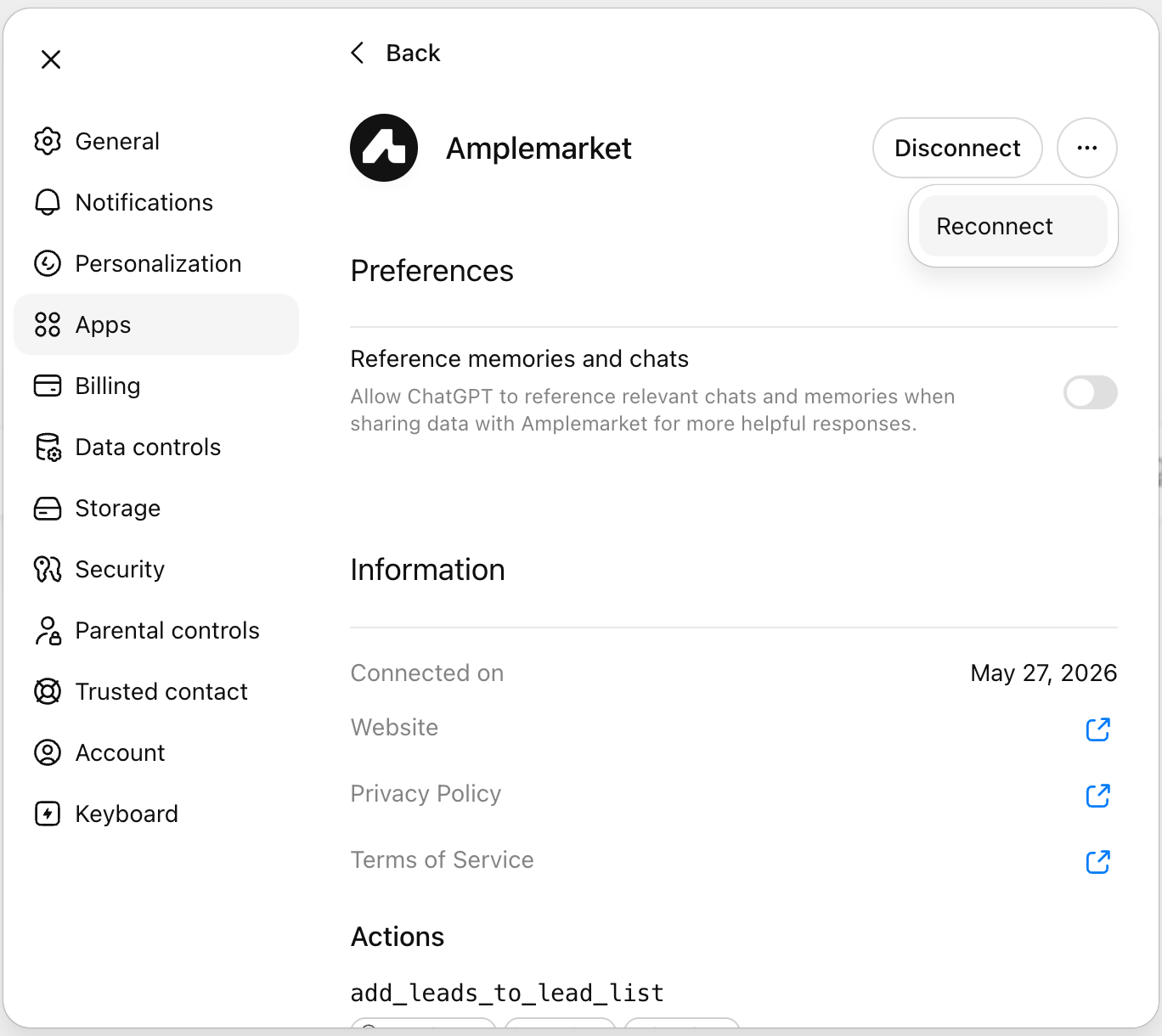
After refreshing, start a new chat to make sure the latest tools are loaded.