Duo Inbox: A detailed guide
Last updated: October 6, 2026
Duo Inbox is an AI sales assistant that integrates seamlessly with your email inbox, to help schedule meetings and handle prospect objections.
Key benefits
Save time (and money): Duo Inbox acts like a dedicated assistant for prospect replies—at a fraction of the cost. We've seen reps recover up to 75% of inbox time, going from ~90 minutes per day to under 20 minutes.
Focus on high-impact sales work: With inbox work handled, reps can prioritize prospecting, campaign execution, calls, and deal strategy.
Higher lead-to-opportunity conversion: Duo Inbox improves conversions by ensuring every inbound reply gets a timely, consistent, and high-quality response, with reliable follow-ups and no missed opportunities.
Faster onboarding: New reps ramp faster as Duo Inbox applies proven reply patterns from day one—no inbox training required.
How it works
Duo Inbox automatically drafts email replies in the background for you.
These drafts are generated and added to your email inbox (e.g. Gmail or Outlook) and your Amplemarket Unibox, whenever you receive a reply from one of your Amplemarket Contacts.
As sources of information for its suggested replies, Duo Inbox will use knowledge from:
Your company value propositions in Duo Messaging Settings.
Your competitor battlecards.
And your Duo Inbox Settings, where you can instruct Duo Inbox on what to say in specific scenarios (e.g. pricing questions, trial questions, product questions, any FAQs really).
How draft generation works
Drafts are automatically generated when a contact replies back to you.
Drafts are added to both your email client (e.g. Gmail or Outlook) and your Amplemarket Unibox. Drafts generated by Duo Inbox in the email client are automatically synced to the Unibox and vice-versa.
Send from Unibox → draft disappears from email client.
Send from email client → draft disappears from Unibox.
On the Unibox, Duo Inbox will also generate drafts for your LinkedIn replies.
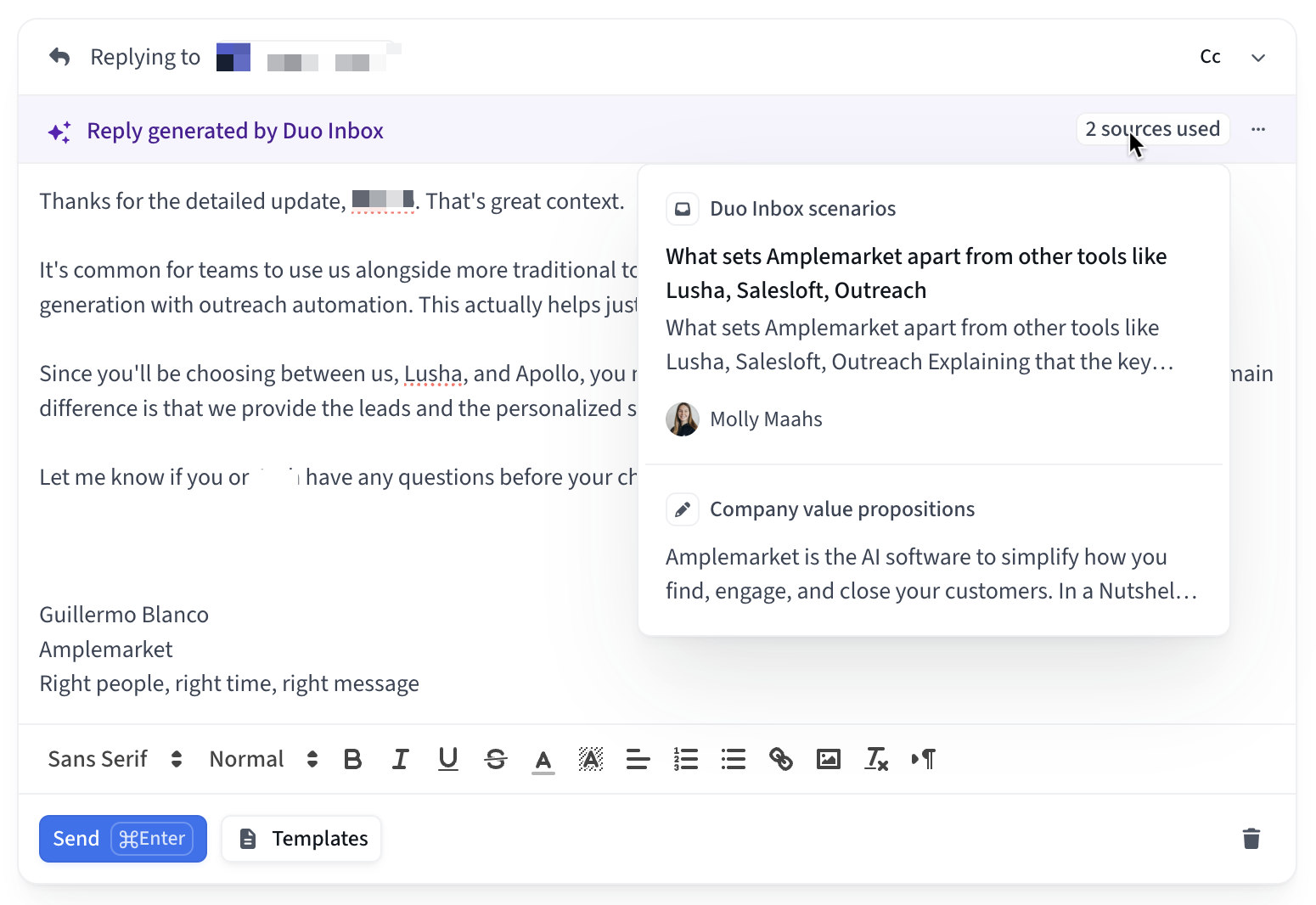
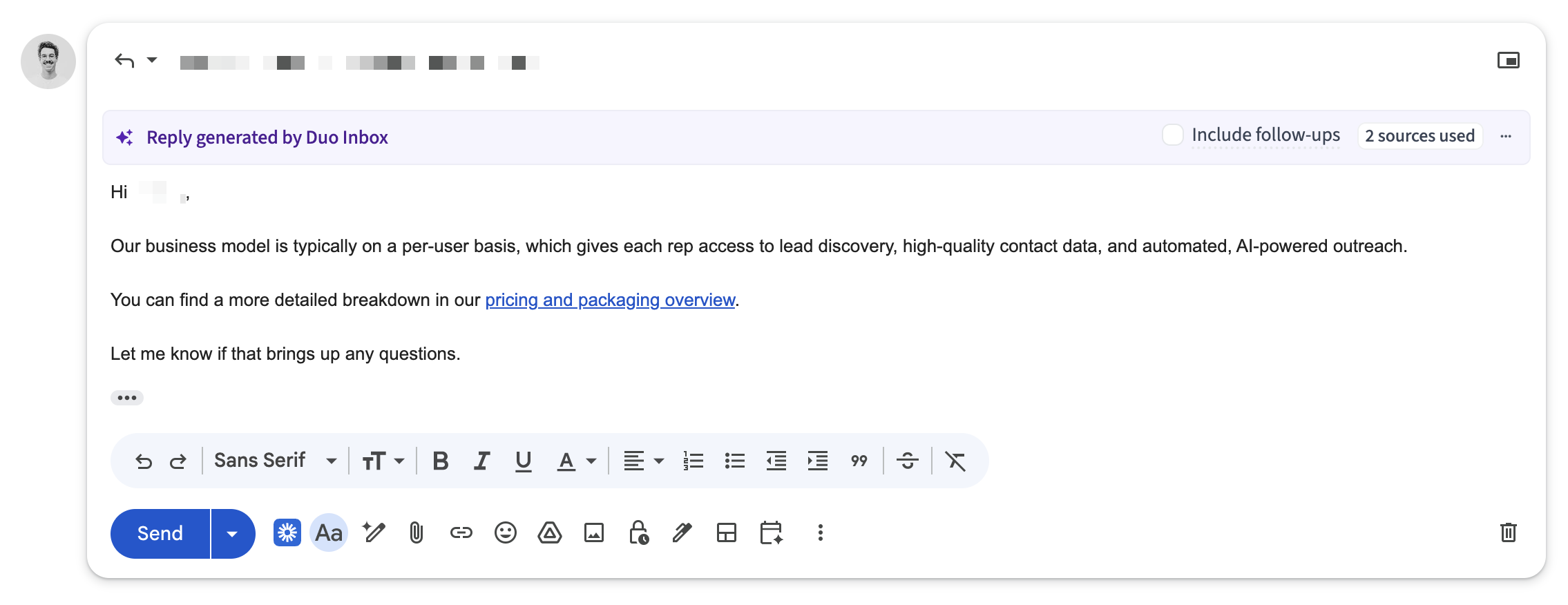
Note 1: To see the Duo Inbox purple banner on Gmail (banner is not supported for Outlook users) you need to have the Amplemarket extension installed.
Note 2: The banner will allow you to see the sources used for the draft and will also allow you to automatically send follow-up emails that are only sent if the lead doesn't reply back to you.
Creating Custom Scenarios
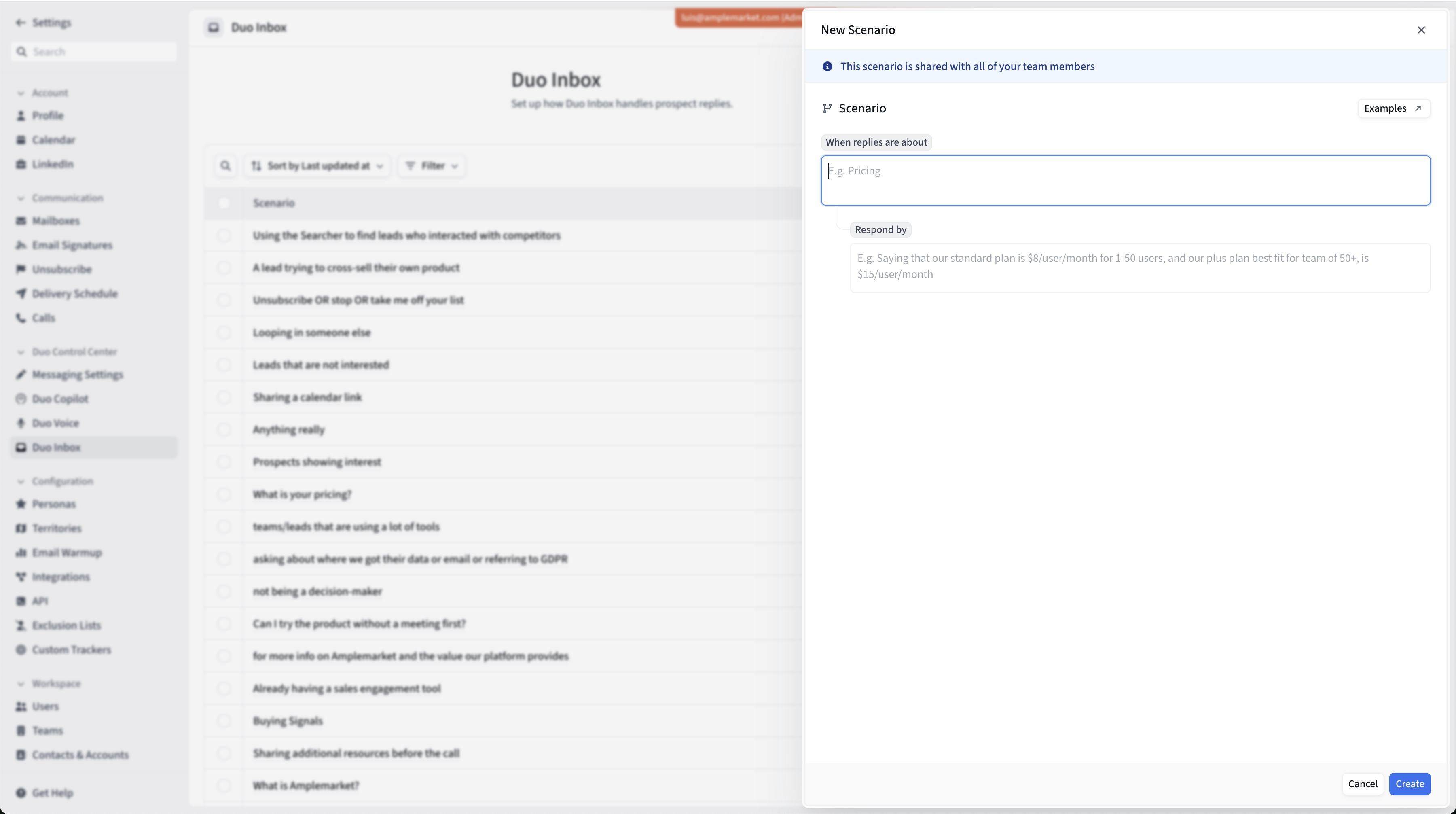
You'll notice that there's an option to add custom reply scenarios with instructions for how Duo Inbox should responde in certain situations. These scenarios can be added via the form displayed above, on this page.
Duo Inbox works well without custom scenarios (mostly based on public information about your company, the context of each conversation thread, your company value propositions and competitor battlecards), but you'll notice that the quality of the replies it generates for you will significantly improve once you start adding instructions for how to handle specific scenarios. Especially for frequently asked questions your team gets.
You can get creative with the instructions you give it - think of this process as if you were giving instructions to a new SDR for how they should handle prospect replies - but some of the most common themes are:
Battlecards for common prospect objections;
More details about your product and specific features;
Canned replies to frequently asked questions;
Etc.
Remember to keep instructions generic, as all of them will apply to all users in the account.
You can see more examples below.
Frequently Asked Questions
Got a reply but I'm not seeing any Duo Inbox draft
Confirm that the following conditions apply:
Confirm access to the feature: See if you can open Duo Inbox Settings (here) or if you're prompted to talk to our team. If you're being prompted to talk to our team, that means you don't have Duo Inbox access.
Confirm mailbox connection: The mailbox where you're expecting to get Duo Inbox draft replies must be connected to Amplemarket. Verify this in your mailbox settings.
Confirm email recipient status: You need to be the main recipient of the email. Drafts are not created for messages where you are CC'd or BCC'd.
How do I stop Duo Inbox from drafting replies?
You can disable automatic reply drafts for your own account from Settings > Duo Inbox > Settings. Under the automatic draft setting, select one of these options:
All conversations
All conversations with contacts
Never — disables Duo Inbox so that no replies will be drafted.
This setting applies only at the user level and affects only your personal account. For narrower filtering, label and source exclusions are also available. You do not need to disconnect your mailbox or ask an administrator to change this setting.
Does Duo Inbox support all email clients and providers?
It supports the vast majority of them yes (Gmail, Outlook, Spark, etc). We do not support Superhuman, for instance. From a more technical perspective, we support every client that adheres to the default IMAP structure.
The only difference in the overall experience is that our Chrome extension does not support non-Gmail email clients. That means that in those set ups you won't have access to the 2 Duo Inbox features for email clients that our Chrome extension enables:
1. The Duo Inbox banner that sits on top of each Duo Inbox draft on Gmail (see here).
2. The Duo Inbox automatic follow-ups (see here).
What are some good examples of Duo Inbox scenarios?
Think of Duo Inbox scenarios as internal playbooks/guidelines you’d give to a new SDR for how to address common prospect questions, objections, etc.
Some examples to help you get started:
When replies are about: Pricing
Respond by: Saying that our pricing is per-user and usually starts at 500$/user/month, but ultimately depends on team size and feature selection. Suggest a short call to give accurate pricing estimate.
When replies are about: Starting or getting access to a trial
Respond by: Saying that we don’t offer a fully self-serve trial. The product works best when connected to real CRM data, so we usually start with a short intro call to understand the setup and goals.
When replies are about: Learning more about our product and services
Respond by: Explaining at a high level that we use a mix of public and proprietary data sources, and share our data & compliance page if they want more detail: https://example.com/data-and-compliance
When replies are about: SOC 2, security, or compliance
Respond by: Saying that we are SOC 2 Type II compliant and take security seriously. Share a link to our security and compliance page for full details: https://example.com/security. Offer to answer any specific security or procurement questions they may have or intro them to our Legal team.
When replies are about: “Not interested”
Respond by: Acknowledging the response politely and try to understand the reason. Ask a short follow-up to clarify whether they don’t currently have this problem, or if they’re currently mitigating it with another alternative.
When replies are about: Requesting more details about our product or service
Respond by: Saying that we help mid-market and enterprise logistics teams manage and optimize their freight operations end-to-end. Our platform combines 1) real-time shipment visibility, across carriers and modes (road, sea, air); 2) operational alerts and exception management (delays, missed pickups, cost overruns and 3) carrier performance analytics to track reliability, pricing, and SLAs.
Share our product overview deck for a visual walkthrough: https://example.com/freight-platform-overview
Suggest a short call to understand their current freight setup (carriers, regions, volume) and walk through the parts of the platform that are most relevant. Use the call to assess whether a trial makes sense based on data availability and operational complexity.
How do I enable Duo Inbox for my team?
Duo Inbox is available by default for all users if you are on an Elite plan. If you would like to get access to Duo Inbox, reach out to support@amplemarket.com.