Duo Copilot Dismisses Explained
Last updated: October 21, 2025
TL;DR
When you dismiss a Duo recommendation, what you select as the reason matters:
Bad Company or Not the Right Person: Excludes that company/person from your feed for at least the next 6 months.
Note: On these two dismiss options, admin users will also get asked to specify why the person or company was not the right one (e.g., wrong industry, location, seniority). Duo will use that to automatically update the applied signal filters and improve recommendations for the whole team. Learn more below.
Bad Signal: Prevents that specific signal (that LinkedIn post, that job opening, etc.) from triggering more leads for you only.
Other Reason: Just removes that one recommendation. No learning happens.
Dismiss Options
When dismissing a recommendation, you can choose from four reasons:
1. Bad company dismisses 🏢
Use this when the company itself is wrong for you.
What happens immediately:
The company is removed from your feed.
All other pending recommendations for that company in your feed are automatically dismissed.
For non-admin users: By dismissing a recommendation as "Bad company", you'll make sure that that company isn't recommended to you again for at least the next 6 months.
Learning scope:
For non-admin users: By dismissing a recommendation as "Bad company", you'll make sure that that company isn't recommended to you again for at least the next 6 months.

Dismiss options for non-admin users.
For admin users: By dismissing a recommendation as "Bad company", you'll still make sure that that company isn't recommended to you again for at least the next 6 months, but you'll also be given the chance to provide more details about why that's a bad company. And by providing this additional feedback, you'll help Duo Copilot understand the specific traits that make that a bad company and use that in the future to avoid recommending similar companies to you and other people on your team that share the same signals. You can learn more about how this learning propagates below (here).

Dismiss options for admin users with ability to give additional feedback. 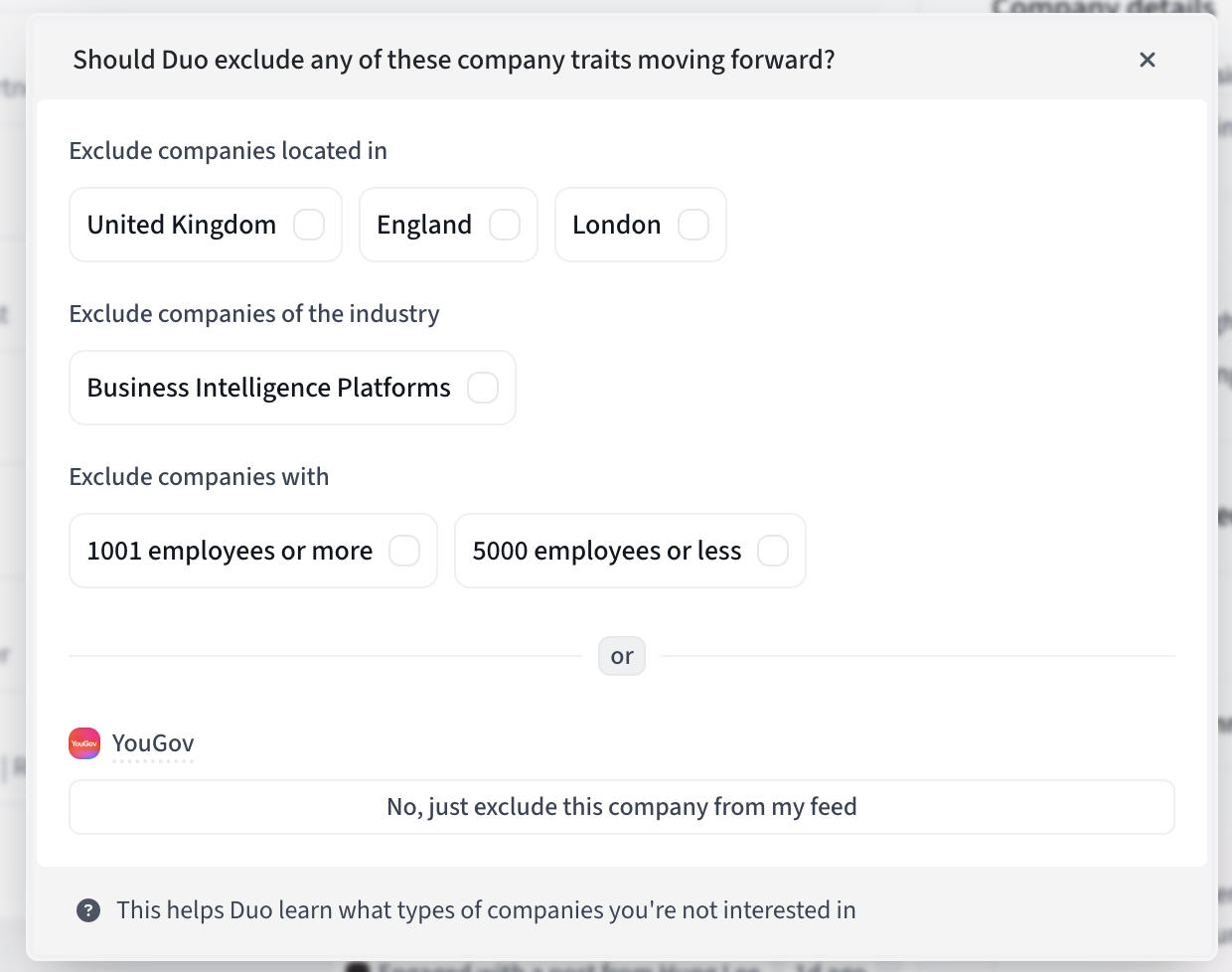
Additional dismiss feedback modal (available to admin users only).
2. Not the right person dismisses 👤
Use this when the person (not the company) is wrong.
What happens immediately:
That specific person is removed from your feed.
Learning scope:
For non-admin users: Similarly to bad company dismisses (see above), by dismissing a recommendation as "Not the right person", you'll make sure that that person isn't recommended to you again for at least the next 6 months.
For admins users: By dismissing a recommendation as "Not the right person", you'll still make sure that that person isn't recommended to you again for at least the next 6 months, but you'll also be given the chance to provide more details about why it's not the right person. And by providing this additional feedback, you'll help Duo Copilot understand the specific traits that make them the wrong person and use that in the future to avoid recommending similar people to you and other people on your team that share the same signals. You can learn more about how this learning propagates below (here).
3. Bad signal dismisses 📡
Use this when the signal that triggered the recommendation isn't relevant.

Examples of signals: LinkedIn post engagement, a job opening, a news event, a funding announcement, etc.
What happens:
That specific signal won't trigger more recommendations.
For example, if the signal is "engaged with LinkedIn post X", no more leads will be recommended based on that specific post.
For company-level signals (funding, job openings, news), all recommendations for that company based on that specific signal (the specific job opening that was marked as bad signal, or the specific news event) are dismissed.
Learning scope:
Makes sure that that signal in specific (the post, the job opening itself) doesn't trigger again for the signal that originated it in the first place.
Learning is limited to you (doesn't affect other users -- a bad signal for one person can be a good signal for another one).
4. Other reason dismisses ⏭
Use this when none of the above reasons apply.
What happens:
The recommendation/lead is removed from your feed.
No learning occurs – Duo doesn't have enough context to improve.
This is the most limited dismiss option.
How learning propagates
When admins dismiss a recommendation as Bad Company or Not the Right Person, they're shown a follow-up modal asking for specific details:
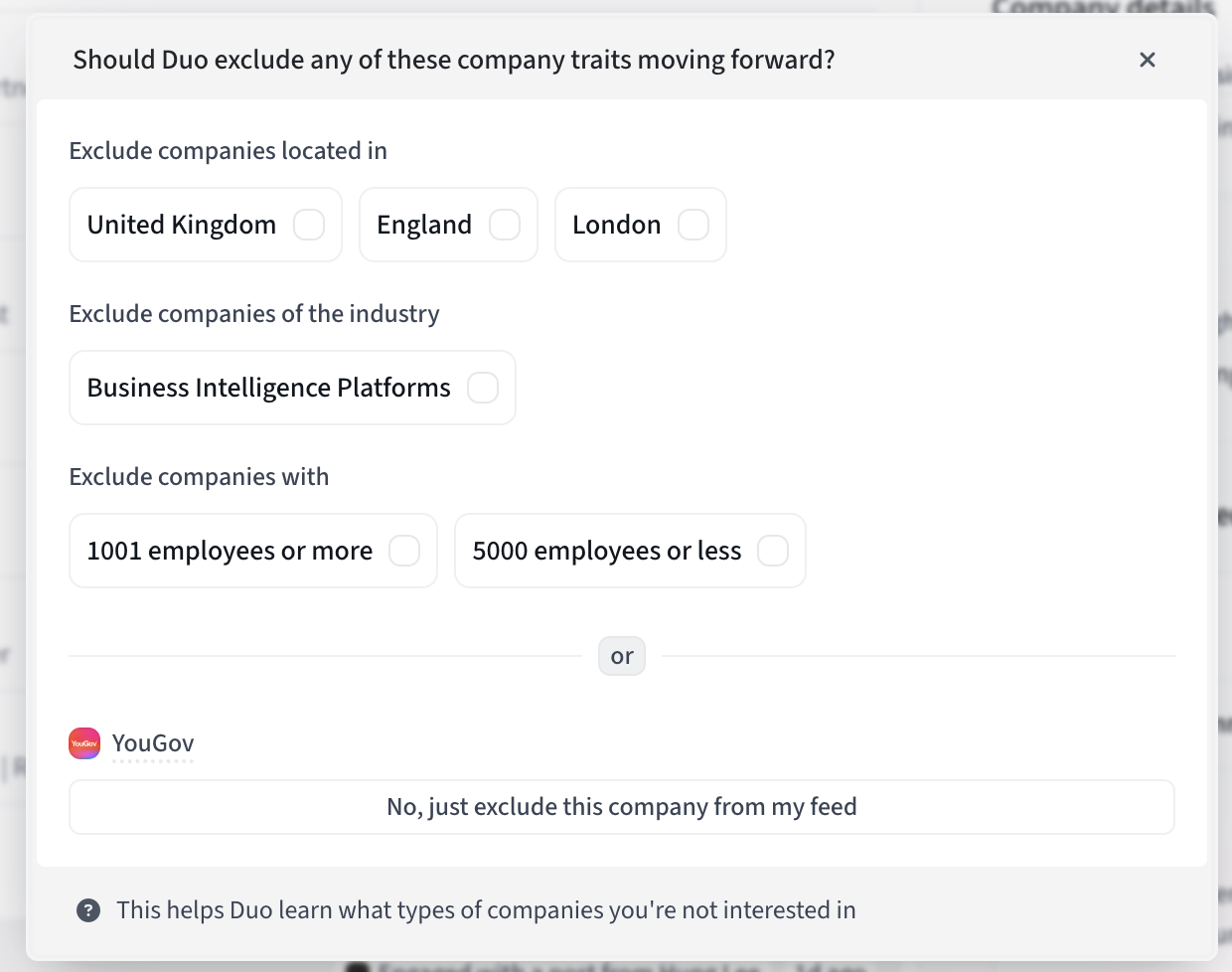
What Duo Copilot does with this feedback
When you select specific traits following your dismiss reasons, Duo will automatically exclude these traits from the filters of the signal that created the bad recommendation. This means other users assigned to that signal will also benefit from your feedback.
But the learning can spread even further:
Without Personas: The traits are excluded from the signal filters of the specific signal that created the bad recommendation and so all users assigned to this signal will benefit from the feedback provided by this user.
With Personas: But if the signal filters have Persona filters applied, the selected traits will be excluded from the Persona filters instead. And since Personas can be reused across multiple signals, your feedback now improves all signals using those Personas — for everyone assigned to them.
Key Principles
1. More specific feedback = Better learning
- Basic dismisses (without traits) only affect you.
- Detailed feedback (with traits) can improve recommendations for your entire team.
2. Personas amplify learning
- If your signals use Personas, trait-based learning spreads across all signals using those Personas.
- Without Personas, learning is limited to the specific signal that originated the bad recommendation.
3. Bad signal has limited scope
- Only prevents that specific signal instance from triggering more leads.
- For now, signal configuration isn't updated.
4. "Other" is a last resort
- Use only when none of the specific reasons apply.
- Provides the least value for Duo's learning.
Best Practices
1. Choose the most specific dismiss reason.
- This helps Duo learn more effectively.
2. Admins: Always provide trait feedback when possible.
- It takes a few extra seconds but improves feed quality for everyone.
3. Use "Bad signal" appropriately.
- Only when the signal itself (the trigger) is wrong, not when the person or company is wrong.
4. Avoid "Other" when possible
- If a recommendation is bad because of the person, company, or signal, use those specific options instead.
Frequently Asked Questions
Q: Why do I sometimes see the same company/person again after dismissing?
A: If you used "Other reason" or "Bad Signal", that specific person/company isn't excluded from future recommendations. Use "Bad Company" or "Not the Right Person" instead.
Q: Will my dismissal affect my teammates?
A: Only if you provide additional feedback (i.e. select from the person or company traits available which of them are responsible for the person or company being a bad one -- see image below). If you don't provide feedback and simply dismiss leads as bad company or not the right person (without providing additional details into why) Duo will only make sure that those people or companies are not recommended to you again.
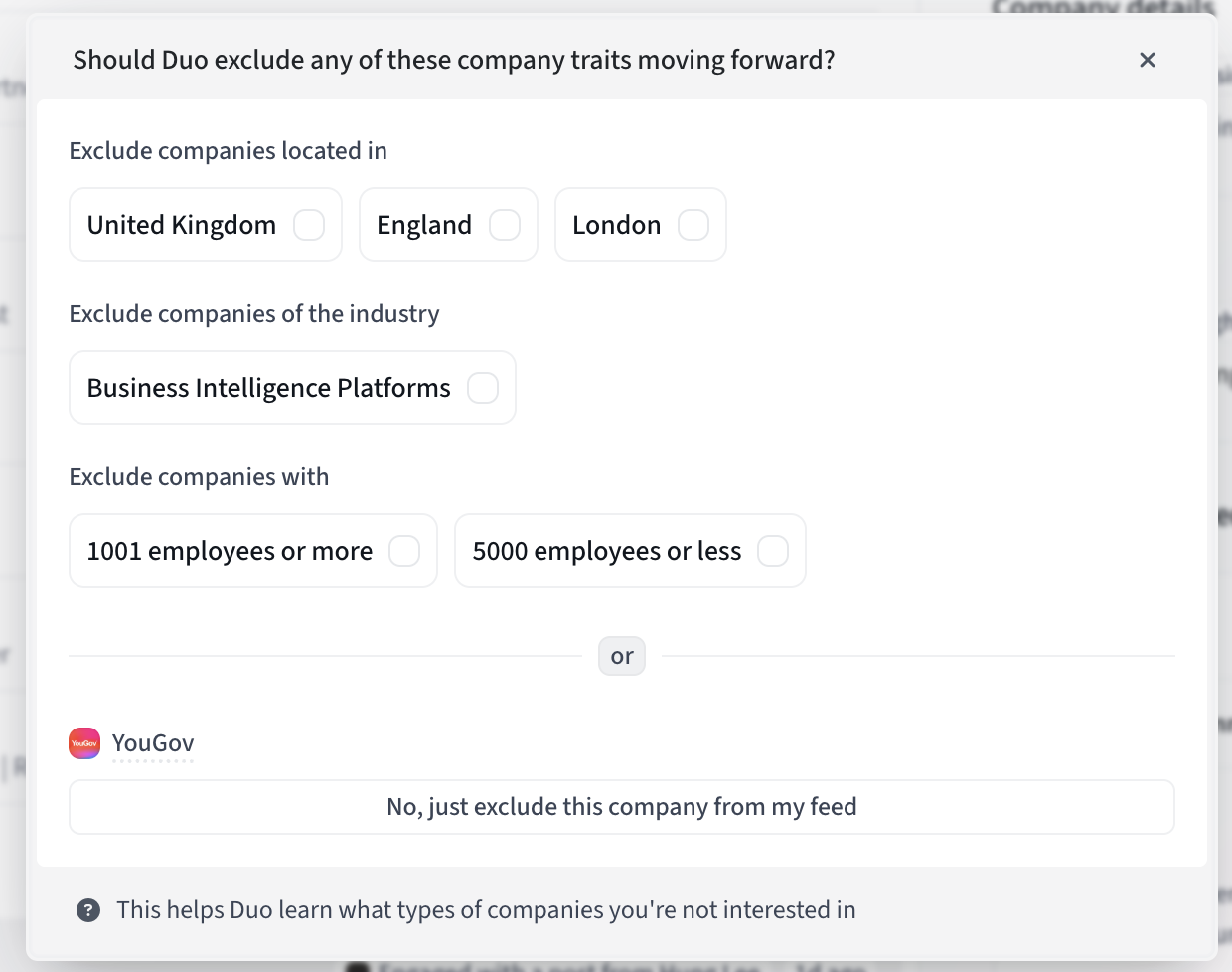
Note: As of today, the ability to give additional feedback on "bad company" and "not the right person dismisses" is only available for admin users since this feedback will impact signal configuration and they are the only ones with permissions to do so. Check the rest of this article to learn more.
Q: Can I see what I've excluded/dismissed?
A: We don't currently have a log of your past dismiss actions and their impact on signal configuration — though this is something we're considering for the future.
When you provide additional feedback on a "bad company" or "not the right person" dismiss though, you can navigate to the affected Signals or Personas to look at the filter exclusions applied.
Q: What if I accidentally dismissed something?
A: Unfortunately, there's no "undo" button yet — but we have plans to build this capability soon. For now, if you need to reverse a dismiss, contact our support team and they can help you out.